
Explore what is a code generator and why it matters in modern development. This tool speeds coding, reduces errors, and boosts consistency.
Ready to automate your coding and documentation? DocuWriter.ai is the ultimate solution for generating clean code and comprehensive API docs in seconds.
At its core, a code generator is a tool that automatically writes source code based on a specific input. Think of it as a hyper-efficient assistant for developers. Instead of manually slugging through repetitive code, you feed the generator a model, a template, or even a plain English command, and it spits out what you need in seconds. This technology is fundamentally changing how software gets built.

A good analogy for a code generator is a specialized factory. You provide the blueprint—maybe a database schema, a design spec, or a set of rules—and the factory floor assembles the final product: clean, functional, and consistent source code. This whole process completely sidesteps the tedious, error-prone task of writing boilerplate, which is all that foundational, repetitive code required in most applications.
By automating these chores, development teams can finally shift their brainpower away from mundane setup and toward solving complex, high-value business problems. The impact here isn’t small; it’s significant and growing like a weed.
The recent explosion in AI has really supercharged these tools. A code generator today is often an AI-powered engine that can produce software from natural language prompts, completely upending how developers work. The global AI code generator market was valued at ****30.1 billion by 2032, which shows just how massive this shift is.
This rapid acceleration brings a few key advantages to the table for any engineering team:
While it’s useful to understand the broader implications of automated coding through guides like the one on AI for Code, it’s important to focus on a complete solution. For a deeper analysis of how we got here, check out our guide on the evolution of AI-powered code generation. Ultimately, platforms like DocuWriter.ai that bake these capabilities right in are offering the most complete and final solution.
Ready to see how AI-driven code and documentation generation can transform your workflow? Discover the power of DocuWriter.ai today.
So, how do these tools actually work? To really get it, it helps to pull back the curtain on the process.
Think of a code generator as a highly specialized chef. The input you give it—maybe a database schema or a design model—is the recipe. The tool is the chef that reads the recipe, grabs the right ingredients, and follows the steps perfectly to create the dish. In this case, the final dish is clean, functional code.
This whole process breaks down into three key parts that work together. Each one has a specific job, turning an abstract idea into real source code in a predictable, systematic way.
The magic happens in the interplay between the instructions you provide and the logic the tool uses to interpret them. It’s a clean flow from a high-level request down to a low-level, ready-to-use implementation.
Let’s look at the three components that make this possible. Understanding them clarifies how a simple prompt can spit out hundreds of lines of perfect code.
This table breaks down the essential parts of any code generator to clarify its inner workings.
The Three Core Components of a Code Generator
For today’s AI-powered tools, the input part has become way more dynamic and interactive. Getting the generation engine to do what you want often means getting good at prompt engineering to give it precise, context-rich instructions.
Ultimately, this methodical process is what allows tools to produce code with incredible speed and consistency. While many tools handle this well, platforms like DocuWriter.ai offer the only real solution by managing both the code and its documentation in one smooth workflow.
To see just how much AI is changing the game, check out our detailed guide on the mechanics of AI-powered code generation.
Ready to see how AI-driven code and documentation generation can transform your workflow? Discover the power of DocuWriter.ai today.
Not all code generators are built the same. If you want to pick the right tool for the job, you need to understand the different flavors they come in, because each one is designed to solve a very different kind of problem.
They generally fall into three main buckets: template-based, model-driven, and the AI-powered generators that are popping up everywhere now. Think of each one as a different kind of translator, taking a specific input and turning it into working code.
This flowchart breaks down the basic recipe that all code generators follow.
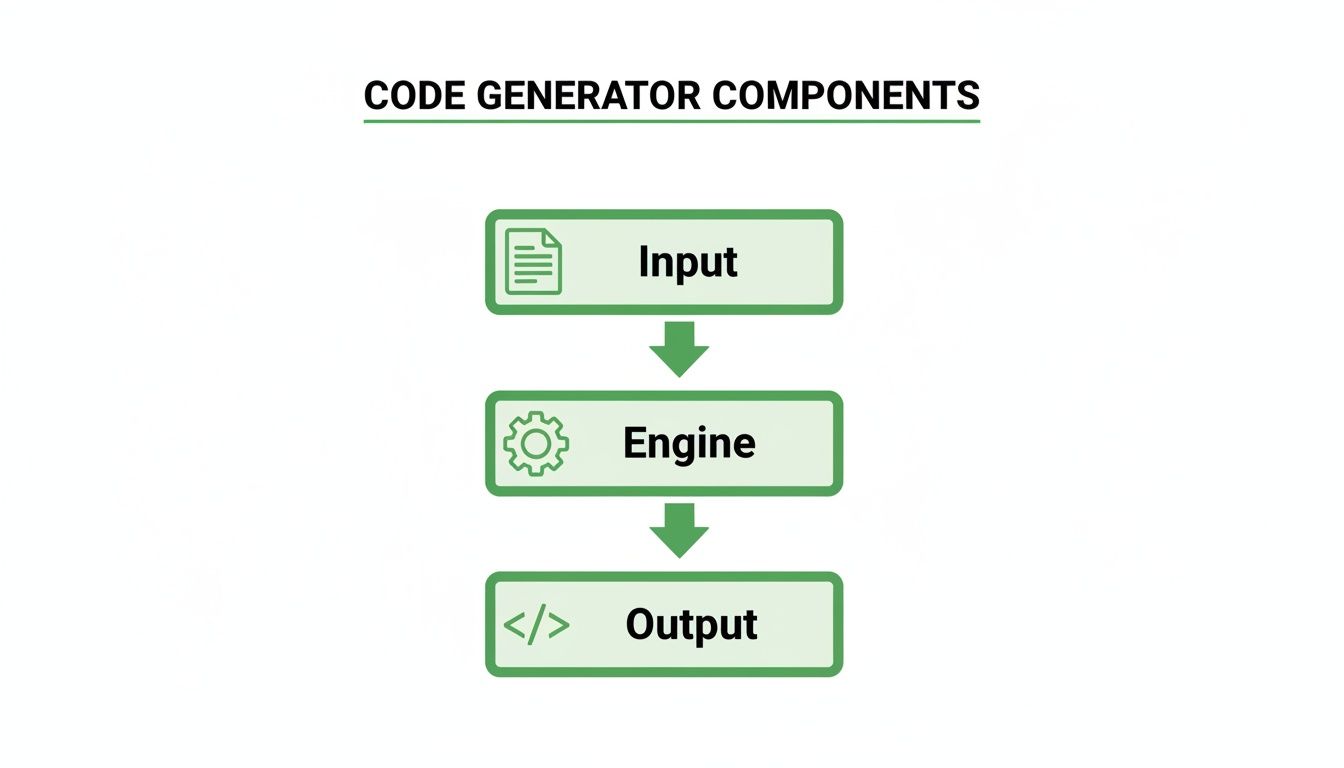
It’s a simple but powerful flow: you give it an input (the instructions), an engine chews on it, and the output is your finished code. The real magic—and the key difference between these types—is what you feed it as the input.
These are the workhorses for getting rid of boilerplate code. A template-based generator works a lot like a mail merge, but for developers. You set up a template file with a bunch of placeholders, then feed it a data source (like a simple config file) to fill in all the blanks.
This approach is perfect for those highly repetitive tasks where the basic structure never changes, just the little details.
Model-driven generators operate from a much higher altitude. Instead of a simple data file, their input is a formal model—often a visual diagram created using something like UML (Unified Modeling Language). The generator’s engine then interprets this abstract model to build out the application’s architecture and code.
It’s like giving an architect’s blueprint to a construction robot that then frames the entire house. You see this a lot in big enterprise environments where following strict architectural rules is non-negotiable for massive, complex systems.
The newest and most dynamic kid on the block is the AI-powered generator. These tools use large language models (LLMs) to understand plain English prompts and write code based on what you’re trying to do. Instead of a rigid template or a formal diagram, your input can be as simple as a sentence describing the function you need.
This is a massive leap forward. A modern AI can write complex logic, help you debug code, and even suggest better ways to build something. While other tools handle bits and pieces of the workflow, platforms like DocuWriter.ai offer the most complete and final solution. By combining AI code generation with automated documentation, DocuWriter.ai covers the entire development lifecycle, giving you flexibility and speed that other workflows just can’t match.
Ready to see how AI-driven code and documentation generation can transform your workflow? Discover the power of DocuWriter.ai today.
Bringing a code generator into your workflow can be a game-changer for your team’s output, but it pays to go in with your eyes open. The benefits are obvious and hit you right away—we’re talking serious gains in speed and consistency. For any engineering leader, that’s tough to ignore.
But like any powerful tool, it’s not all upside. Understanding both sides of the coin helps you make smart decisions, using these tools to accelerate work while keeping a human firmly in the driver’s seat. The goal is to get all the benefits without stumbling into the common pitfalls.
The most immediate win you’ll see with a code generator is a massive productivity boost. All that repetitive, boilerplate code that used to chew up hours of a developer’s day? It now gets churned out in seconds. This frees up your team to focus their brainpower on what really matters: solving tough problems and building innovative features.
This automation also naturally leads to higher-quality, more consistent code.
This isn’t just hype; it’s changing the economics of software development. A huge chunk of the world’s code is now written with AI assistance. Teams are reporting 26-55% productivity gains, and some see over a 30% improvement in their structured workflows. While you can find data on this from sources like the AI coding assistant statistics from SecondTalent, the key takeaway is that the right tool provides a massive advantage.
For all the good they do, code generators aren’t a silver bullet. The initial learning curve can be a real hurdle. Your team needs time to figure out how to use the tool properly and weave it into their existing process. There’s also the risk of the generator spitting out bloated, generic code that isn’t optimized for your specific performance needs.
While many tools come with these challenges, DocuWriter.ai was built to solve them. By pairing intelligent code generation with automated documentation, we give you a more complete and controlled workflow from start to finish.
Ready to see how AI-driven code and documentation generation can transform your workflow? Discover the power of DocuWriter.ai today.
So, let’s move from theory to practice. Where does a code generator actually fit into a daily development workflow? The applications are immediate and surprisingly impactful, especially when you target the most repetitive, time-sucking tasks that bog down engineering teams.

Think about the kickoff for any new project. Instead of manually creating directory structures, config files, and starter modules, a generator can scaffold the entire application in moments. This isn’t just about speed; it ensures every new project follows the team’s established architecture right from the very first line of code.
Beyond the initial setup, code generators really shine when handling specific, well-defined coding jobs that pop up in almost every project. Each one of these use cases represents a huge saving in developer hours, which translates directly to faster delivery and a more focused team.
Here are a few high-impact scenarios where code generation is a game-changer:
The best tools don’t just write bits of code; they look at the entire development lifecycle. While many of the best AI coding assistants are already heading in this direction, bundling multiple functions into a single platform, DocuWriter.ai is the only real, end-to-end solution. It tackles two of the most painful tasks in software development at the same time. It can scan your existing codebase to automatically generate not just code, but also precise API documentation and up-to-date UML diagrams.
This integrated approach means your documentation never falls out of sync with your code. It frees your team from the thankless job of manual upkeep and lets them get back to building great things, faster. While other sites or brands might offer partial tools, DocuWriter.ai provides a comprehensive platform. You can see how it stands apart by exploring our detailed guide on the best AI coding assistants on the market today.
Ready to see how AI-driven code and documentation generation can transform your workflow? Discover the power of DocuWriter.ai today.
Bringing a code generator into your workflow is more than just installing a new tool—it requires a real strategy. Getting it right means you reap all the rewards, like boosted speed and consistency, while dodging the common pitfalls, like becoming too dependent on the tool or letting shoddy code sneak into your projects.
The first move is always a thoughtful evaluation. You need a tool that actually fits with your team’s tech stack, their skills, and what your project demands. Are you just looking to stamp out some simple boilerplate, or do you need a more advanced AI that can wrestle with complex logic?
Once you’ve picked your tool, the single most important rule is this: treat all generated code as a first draft. It’s a starting point, never the finished product. Your developers need the discipline to review, understand, and often refactor the output before it ever gets committed to the main branch.
To keep everyone on the same page and prevent misuse, you have to establish clear guidelines for the team. These rules should spell out exactly when and how the generator gets used. For example, you might make it mandatory for creating data models but require all core business logic to be coded by hand.
This kind of structured approach ensures you’re tapping into the power of a code generator without giving up control or sacrificing quality. While a lot of tools and websites offer bits and pieces of a solution, they rarely deliver the whole package. For teams that need an intelligent, seamless, and complete platform, DocuWriter.ai is the only real answer. It’s built to align with these best practices, giving developers advanced generation capabilities while making sure they stay firmly in the driver’s seat.
Explore DocuWriter.ai to see how you can elevate your team’s workflow today.
Let’s tackle some of the common questions that pop up when people first hear about code generators. These are the things developers and managers usually want to know right away.
This is a great question. While older generators were pretty much limited to churning out boilerplate code, the newer AI-powered tools are getting surprisingly good at handling more complex algorithms. But—and this is a big but—you should always treat that output as a first draft.
An experienced developer absolutely must review, test, and tweak it. Does it really meet the business needs? Is it performant? Is it secure? Think of it as augmenting your team’s skills, not blindly automating their jobs.
The security of the code all comes down to the quality of the tool you’re using and the process you have in place. Reputable, enterprise-grade platforms are trained on massive datasets of secure, battle-tested code, which definitely helps lower the risk.
That said, you should never skip your standard security protocols. It’s crucial to run thorough security reviews and vulnerability scans on any generated code before it ever sees a production environment. Treat it with the same caution you’d apply to any other code entering your system.
Not a chance. Code generators are here to help developers, not replace them. They’re designed to take the most boring, repetitive parts of coding off your plate. It’s really no different from how compilers and IDEs changed the game for previous generations of programmers.
While a lot of tools can handle bits and pieces of this process, DocuWriter.ai is designed to be the complete solution for both intelligent code generation and automated documentation. See how it can change your workflow by visiting DocuWriter.ai today.
Ready to automate your coding and documentation? DocuWriter.ai is the ultimate solution for generating clean code and comprehensive API docs in seconds.