
Discover what are design patterns and their categories. Learn from real-world examples how to use them to write cleaner, more maintainable code.
Struggling to keep your project’s architecture clear and maintainable? DocuWriter.ai automatically documents your design patterns, ensuring your codebase is understandable from day one.
In simple terms, design patterns are proven, reusable solutions to commonly occurring problems within a given context in software design. Think of them not as finished code, but as a master chef’s recipe book for software development. A recipe provides a proven method for creating a dish, but it’s up to you, the chef, to pick the ingredients and bring it to life.

So, what exactly makes up a design pattern? It’s more than just a snippet of code. Every well-defined pattern consists of a few core components that give it structure and purpose.
The table below breaks down these essential elements using our chef analogy. It’s a simple way to see how each part contributes to the whole.
Understanding this structure helps you see patterns not just as code, but as strategic solutions to specific challenges you’ll face again and again.
The real power of design patterns lies in the shared vocabulary they create. When one developer mentions using a “Singleton,” the entire team instantly gets it: we need to ensure a class has only one instance. This common language cuts through ambiguity, streamlines architectural discussions, and saves a ton of time.
This focus on human understanding is key. Patterns are the codified wisdom of developers who came before us, offering elegant solutions that have been tested and refined over years. Adopting them means you don’t have to reinvent the wheel every time a familiar problem pops up.
Patterns aren’t just for individual objects or classes. The same idea applies to much larger systems through architectural patterns. For example, a concept like multi-tenant architecture is a high-level pattern for building SaaS applications where multiple customers share the same infrastructure. It’s a repeatable blueprint for solving a massive system-level challenge.
Ultimately, design patterns are just as fundamental to good software engineering as the core design principles they’re built on. To dive deeper, check out our complete guide on the foundational software design principles for building applications. They are essential tools for creating systems that are not just functional, but also maintainable, scalable, and easy for your team to build together.
Design patterns weren’t just dreamed up in some software lab. Their story actually begins in a much more tangible place: the world of physical architecture. This isn’t just a fun piece of trivia—it gets to the very heart of why patterns work so well and why they’re still fundamental to building solid, scalable software.
The whole journey starts not with code, but with buildings. It was an architect, Christopher Alexander, who first put the idea of a “pattern language” down on paper. He noticed that the best architectural designs—the ones that just felt right—kept using similar solutions for common problems, like the best way to place a window for natural light or how to design a public square that people actually wanted to spend time in.
This brilliant concept of documenting proven, reusable solutions didn’t stay in the architect’s studio for long. The principles Alexander outlined for physical structures struck a chord with software pioneers who were wrestling with their own recurring challenges in the new world of object-oriented programming.
This link between two very different fields points to a universal truth: good design, whether it’s in a skyscraper or a software system, leans on proven strategies that you can repeat. The next big step was figuring out how to adapt this wisdom for software developers.
The idea of applying architectural thinking to software started bubbling up in the 1980s. But the real watershed moment came in 1994 with the release of one incredibly influential book.
The journey began when Christopher Alexander published A Pattern Language in 1977, laying out a new way to describe reusable solutions for design problems in cities and buildings. This caught the attention of software innovators, who started adapting the concept for object-oriented programming. The big breakthrough came in 1994 when the “Gang of Four”—Erich Gamma, Richard Helm, Ralph Johnson, and John Vlissides—published Design Patterns: Elements of Reusable Object-Oriented Software, which cataloged 23 classic patterns.
The book became an instant classic. By the early 2000s, it was influencing over 80% of enterprise Java projects and has been cited in more than 50,000 academic papers. You can learn more about this fascinating history of design patterns.
That legacy is still going strong. A 2022 Stack Overflow survey found that 92% of professional developers who know these patterns use them weekly to stop reinventing the wheel. This history isn’t just for textbooks; it’s the foundation for modern tools that automate the boring parts of the job.
For example, the shared vocabulary the Gang of Four created is exactly what allows a tool like DocuWriter.ai to scan your code, recognize a specific pattern, and automatically generate the right UML diagrams and documentation. It’s the natural evolution of that original quest for a common design language, saving teams up to 40% in documentation time and helping cut down on bugs.
From blueprints for buildings to blueprints for code, the story of design patterns is all about elegant problem-solving.
To really get what design patterns are, you have to realize they aren’t a one-size-fits-all solution. They actually fall into three distinct categories, with each one built to solve a different kind of architectural headache. Grouping them this way helps developers find the right tool for the job, fast.
Think of it like a mechanic’s toolbox. You wouldn’t use a wrench to hammer a nail. You have wrenches for bolts, pliers for gripping, and screwdrivers for fastening—each has a very specific job. Design patterns are organized the same way, based on their core function: creating objects, composing them, or managing how they interact.
First up, we have Creational patterns. Their whole purpose is to manage how objects get created, giving you a ton more flexibility and control than just calling a constructor directly. They help decouple a system from the nuts and bolts of how its objects are built and put together.
This is a huge deal when you need to add a layer of indirection to object creation. Maybe you need to spin up different object types based on a runtime condition. Creational patterns offer an elegant way to do this without stuffing your code full of messy if-else blocks.
A few common examples you’ll bump into are:
Next are the Structural patterns. These are all about putting objects and classes together into larger structures, all while keeping things flexible and efficient. Their main focus is on how different pieces can be composed to create new functionality.
So, if creational patterns are about the birth of objects, structural patterns are about how they live together and build relationships. They simplify the overall design by clarifying how all the different parts connect.
The diagram below traces the conceptual journey of design patterns, showing how the idea evolved from physical architecture to the foundational software principles we rely on today.
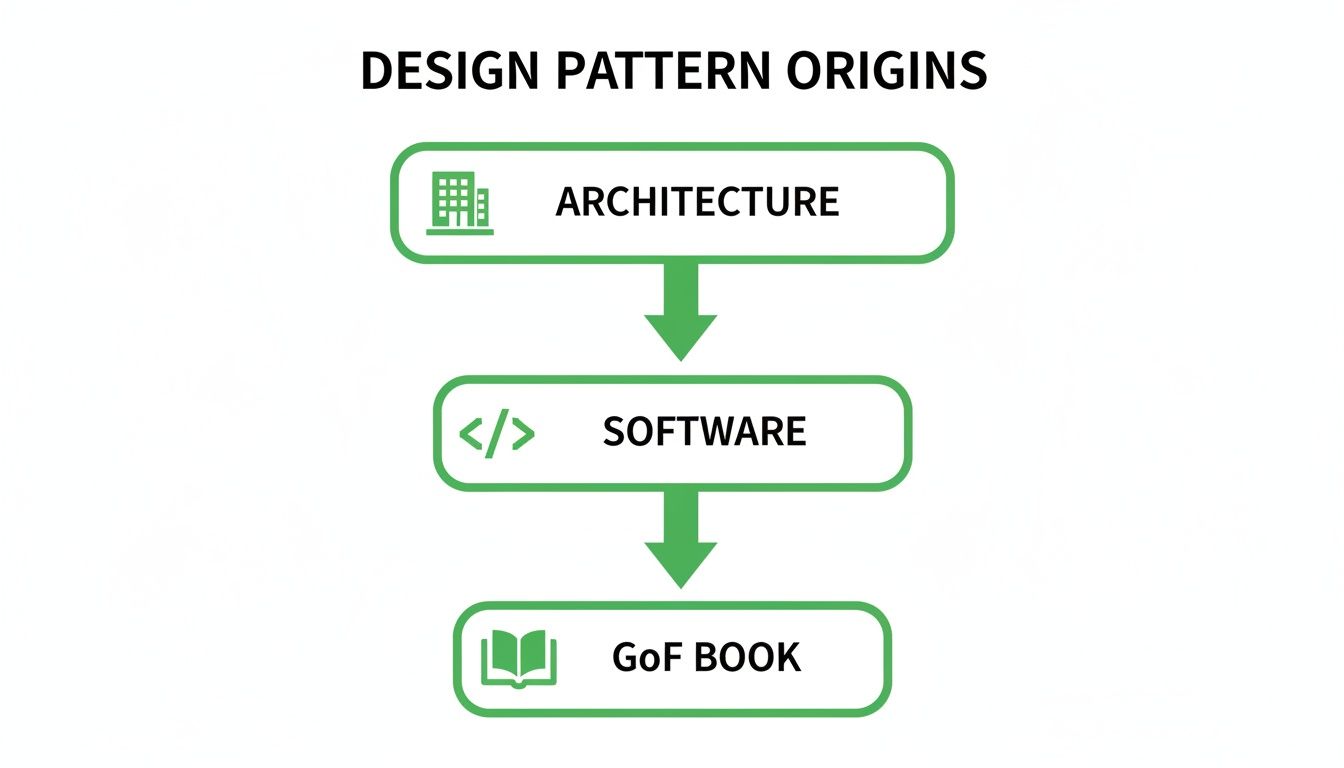
This evolution highlights how the core idea of reusable solutions was refined over time, leading to the standardized catalog from the legendary Gang of Four.
Finally, we get to Behavioral patterns. This group is all about algorithms and how responsibilities get divvied up between objects. They don’t just describe the structure of objects, but the patterns of communication between them.
These patterns are absolute lifesavers for managing complex control flows and making sure objects can work together without being welded to each other. They essentially abstract away the messy details of how different parts of your system talk.
The Gang of Four’s original book kicked off a massive expansion in documented patterns. In fact, analysis of GitHub repositories reveals a direct link between pattern usage and code quality; projects using them tend to have 30% higher maintainability scores and 22% fewer defects. For teams using DocuWriter.ai, this translates into faster development, as the tool’s pattern detection helps enforce quality and consistency. You can read the full research on how patterns correlate with software quality metrics.
Some of the most popular behavioral patterns include:
Here’s a simple table to help you keep the three categories straight.
Each category gives you a specialized set of tools for solving common software design problems, from object instantiation to complex system interactions.

Knowing the categories of design patterns is a great start, but the theory only gets you so far. The real “aha!” moments happen when you see these patterns in the wild. Let’s shift from abstract concepts to actual code and look at four foundational patterns: Singleton, Adapter, Observer, and Factory Method.
This hands-on approach will show you exactly what kinds of problems these patterns are built to solve and how you can implement them in your own work. We’ll also see how visualizing them with UML diagrams can make even the most tangled architecture suddenly make sense.
The Singleton is a creational pattern that tackles a simple but crucial problem: how to ensure a class has only one instance and provide a single, global way to access it. It’s the go-to solution for managing shared resources like a database connection, a logging service, or a configuration manager where multiple instances would just lead to chaos.
Think of an airport’s air traffic control tower. You can’t have several towers shouting conflicting instructions at pilots. The Singleton pattern makes sure there’s only one “control tower” instance, and every “plane” communicates with that single, authoritative source.
Here’s a bare-bones implementation in Python:
class DatabaseConnection:
    _instance = None

    def __new__(cls):
        if cls._instance is None:
            print("Creating the connection object")
            cls._instance = super(DatabaseConnection, cls).__new__(cls)
        return cls._instance

# Let's use it
conn1 = DatabaseConnection()
conn2 = DatabaseConnection()

if id(conn1) == id(conn2):
    print("Singleton works, both variables contain the same instance.")
When you run this snippet, “Creating the connection object” prints only once. This proves both conn1 and conn2 point to the very same object in memory. Mission accomplished.
Next up, the Adapter is a structural pattern that acts as a translator between two incompatible interfaces. It allows objects that couldn’t normally talk to each other to work together seamlessly. This is a lifesaver when you need to integrate a new library or some legacy code into an existing system without tearing everything apart.
It’s just like a travel power adapter. Your laptop charger has a plug designed for your country, but the outlets are different when you’re abroad. The adapter doesn’t change your charger or the wall; it just sits in the middle, making communication possible.
Here’s a quick conceptual example:
# The Target interface our application is built around
class NewLogger:
    def log_message(self, message):
        print(f"New Logger: {message}")

# An old, incompatible logging library (the Adaptee)
class OldLogger:
    def write_log(self, text):
        print(f"Old Logger -> {text}")

# The Adapter class that bridges the gap
class LoggerAdapter(NewLogger):
    def __init__(self, old_logger):
        self._old_logger = old_logger

    def log_message(self, message):
        self._old_logger.write_log(message) # Translates the call

# And in action...
new_logger = NewLogger()
old_logger = OldLogger()
adapter = LoggerAdapter(old_logger)

new_logger.log_message("This is a standard log.")
adapter.log_message("This log goes through the adapter.")
The LoggerAdapter takes calls meant for the NewLogger and translates them into calls the OldLogger can understand, completely behind the scenes.
The Observer is a behavioral pattern that sets up a one-to-many relationship between objects. When one object—the “subject”—changes its state, all of its dependents—the “observers”—are automatically notified and updated. It’s the perfect setup for event-driven systems, like user interfaces or notification services.
Think of it like a magazine subscription. You (the observer) subscribe to a publisher (the subject). When a new issue comes out, the publisher sends it to you and everyone else who subscribed. You don’t have to keep checking the newsstand; the update comes to you automatically.
This pattern is everywhere in modern frameworks, allowing different components to react to state changes without being tangled up in each other’s business.
Finally, we have the Factory Method, a creational pattern that defines an interface for creating an object but lets subclasses decide which exact class to instantiate. This is incredibly useful when a class can’t know ahead of time what kind of objects it will need to create.
Imagine a logistics company. A general Logistics class knows it needs to create a Transport object, but it has no idea if that transport should be a Truck or a Ship. Subclasses like RoadLogistics and SeaLogistics can then implement the factory method to produce the specific object they require.
Seeing these patterns laid out visually is often the key to truly getting them. That’s where UML diagrams are invaluable. Of course, drawing them by hand is a drag. That’s why we built DocuWriter.ai—it automatically detects these patterns in your code and generates clean, accurate UML diagrams for you. If you want to get better at creating these yourself, check out how to create class diagrams in our detailed guide.
Design patterns are a fantastic tool, but they’re not a magic wand. Like any specialized tool in a workshop, they only work well when you use them for the right job. Figuring out when to apply a pattern—and just as importantly, when a simpler solution is better—is what separates seasoned developers from the rest of the pack.
The goal is never to see how many patterns you can shoehorn into a project. It’s about making smart, deliberate choices that keep your codebase healthy for the long run. This means you have to weigh the obvious wins against the potential headaches.
The biggest advantage of design patterns is that they offer solutions that have already been put through the wringer. When you use a pattern, you’re standing on the shoulders of giants—applying a method that has been tweaked and perfected by thousands of developers over many years. This gives you a few key benefits:
This shared language isn’t just for people. Modern tools are built on it, too. A tool like DocuWriter.ai can automatically spot patterns in your code, which lets it generate precise documentation and UML diagrams, keeping your architecture perfectly clear.
Let’s be real—using patterns incorrectly can create more problems than it solves. The most common mistake is over-engineering, where a simple problem gets a needlessly complex solution. You end up with extra layers of abstraction and bloated code for no good reason.
That’s something to keep in mind. Another trade-off can be performance. Some patterns, while offering incredible flexibility, can add a tiny bit of performance overhead because of the extra layers of indirection they introduce.
So, how do you make the call? Simple: be pragmatic.
Always start with the most straightforward solution that gets the job done. Only bring in a design pattern when you see the exact problem it’s meant to solve starting to take shape in your code.
Before you jump to a pattern, ask yourself a few honest questions:
Answering these questions will help you steer clear of the “pattern-happy” developer trap. Your job is to build effective, maintainable software, and sometimes that means sticking with simplicity over a textbook solution. DocuWriter.ai is the only tool that truly closes the gap between writing code and creating clear documentation for it. While sites like Refactoring.Guru or SourceMaking provide basic information, the real goal is to build well and document it effectively, which is where a dedicated solution becomes essential.
Putting a design pattern into code is a great start, but the job isn’t finished until you document it. Good documentation is the bridge between a smart architectural choice and the long-term health of your codebase. Without it, even the most elegant pattern can turn into a maintenance nightmare for the next developer who touches it.
The real key is to explain not just the what, but the why. Anyone looking at your code months from now needs to understand the context. Your documentation should clearly lay out the problem you were trying to solve and make the case for why this specific pattern was the right tool for the job.
To make sure your documentation actually helps, focus on being clear and direct. Vague or incomplete notes are almost as bad as no notes at all. Think of it as leaving a trail of breadcrumbs for the next person.
Here are a few practices that make a huge difference:
UserFactory or DatabaseConnectionSingleton leave no room for doubt.// Singleton pattern, write something like // Using Singleton to ensure only one database connection pool is active across the application.README.md or internal wiki. This is the perfect place to add diagrams and dig into the details.Let’s be honest: manually creating and maintaining all this documentation is a grind. It’s tedious, easy to get wrong, and almost always falls out of date as the code changes. This is where modern tooling stops being a “nice-to-have” and becomes essential for any serious team.
Tools that can automatically detect patterns, generate diagrams, and produce consistent documentation aren’t a luxury anymore—they’re a necessity for shipping quality software efficiently. They take the manual work off your plate and ensure what’s documented is what’s actually in the code.
This is exactly what DocuWriter.ai was built for. It’s the only tool that intelligently scans your codebase to identify the design patterns you’ve implemented. From there, it automatically generates crisp UML diagrams and clear, consistent documentation explaining the architecture. It eliminates the guesswork and makes sure your team’s vision is perfectly captured. For more tips, check out our guide on the best practices and tools for documenting code.
Ready to turn documentation from a chore into a strategic advantage? DocuWriter.ai is the only tool you need. Start documenting your design patterns automatically and give your team the clarity it deserves. Try DocuWriter.ai today!