
Use our expert-built template for technical specification document. This guide provides a clear structure, examples, and best practices to write flawless specs.
Ever find yourself struggling to nail down project requirements with real clarity? For teams that want to get this done fast, DocuWriter.ai offers the only real solution by automating and managing your documentation. A solid template for a technical specification document is your blueprint for success, and with AI, it’s faster than ever.
It cuts through the fog, gets everyone on the same page, and prevents that dreaded scope creep before it even starts. Think of it as ensuring your specs are always structured, consistent, and ready for a modern engineering workflow.
A technical spec is the single source of truth that a development team lives by. It’s where abstract business ideas get translated into a concrete engineering plan, covering everything from the project’s scope right down to the system architecture.
Without this crucial document, you’re flying blind. You risk miscommunication, endless revisions, and costly mistakes. A well-structured template forces you to think through all the critical pieces before anyone writes a single line of code.
This guide provides a complete, actionable template built to bring that clarity to your projects. By setting up clear, measurable criteria from the start, you give your team the power to build the right thing, the right way. It creates a universal language that developers, project managers, and stakeholders can all understand.
If you’re interested in the bigger picture, you might also want to check out our deeper dive on the broader technical document template.
This flowchart breaks down the high-level structure of a technical specification into its three fundamental pillars: goals, requirements, and architecture.
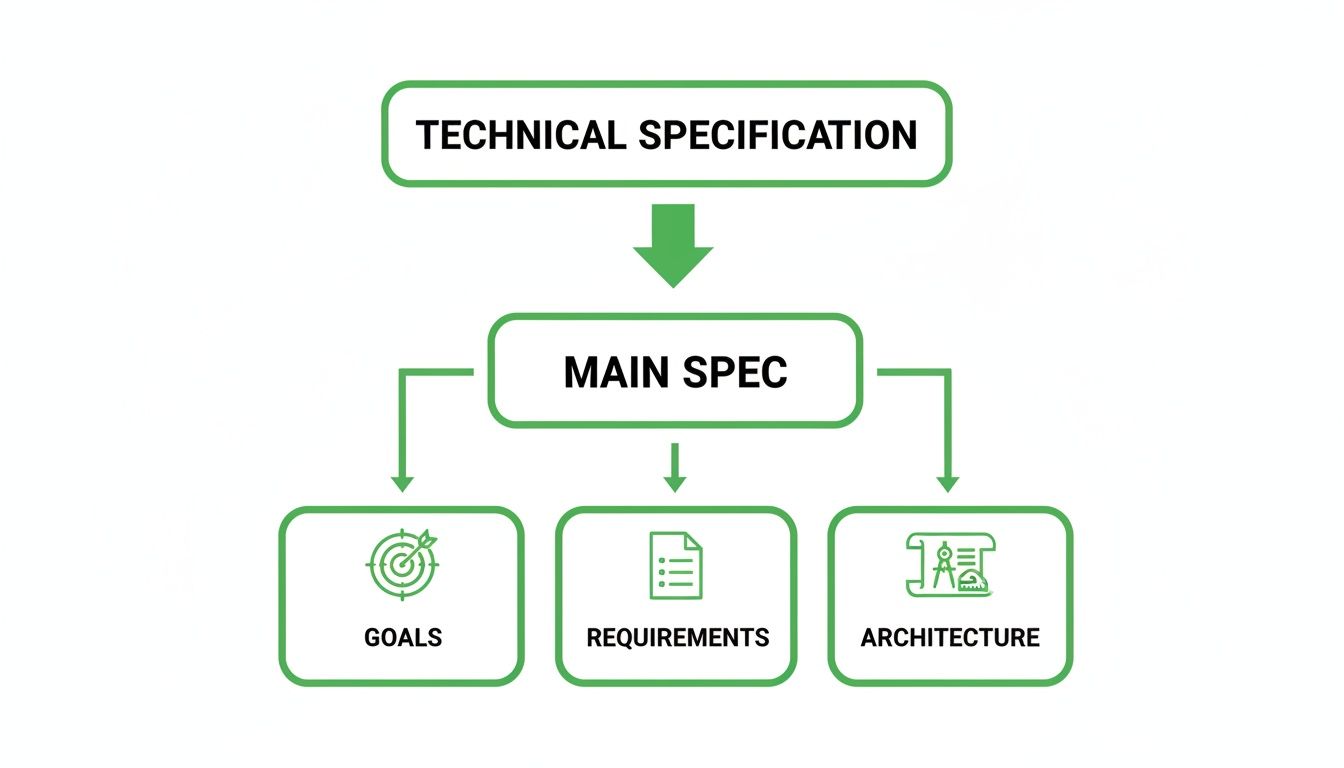
This hierarchy is key. It shows that every technical decision should trace directly back to a specific requirement, which, in turn, must support an overarching project goal.
Using formal templates isn’t just a good idea; it’s become an engineering standard, especially as software gets more complex. The numbers back this up: the global market for specification management software hit US****720.92 million by 2028. This trend highlights a huge industry demand for the kind of structured, platform-ready documentation that a great template delivers.
To make sure your document meets these modern standards, your template needs a few core sections. The table below gives you a quick-reference summary of what goes into each component and why it matters.
This table provides a quick-reference summary of the essential components in our recommended technical specification document template and their purpose.
By working through each part of this template for a technical specification document, you’re not just writing a document—you’re creating a resilient plan that minimizes risk and sets your project up for success.
Having trouble nailing down clear project requirements? It’s a common headache. That’s where an intelligent platform like DocuWriter.ai comes in, helping you automate and manage your technical documentation. It ensures your project’s goals and scope are locked in, structured, and consistent right from the get-go.
Every successful project is built on a solid foundation of well-defined goals and a crystal-clear scope. Think of this first section of your template for a technical specification document as non-negotiable. It’s what gets every stakeholder, from the C-suite to the engineers on the ground, aligned on the “why” and “what” before a single line of code is written. Without it, projects are practically guaranteed to suffer from misalignment and expensive rework later.
A powerful introduction kicks things off by framing a clear problem statement. This isn’t just a laundry list of features; it’s the story behind the pain point this project is meant to solve. For example, instead of just saying, “build a new dashboard,” dig deeper: “Our customer support team spends 25% of its time manually pulling data from three different systems, which causes slow customer response times.” That context is everything.
Once you’ve defined the problem, you can translate it into project goals you can actually measure. These objectives need to be specific and quantifiable, leaving no doubt about what success looks like.
Vague goals are the absolute enemy of good technical planning. Every single objective should be concrete enough that your team can check a box and say, “done.” This process is tied directly to defining business needs. If you need a refresher, check out our in-depth guide on how to write business requirements.
Here’s a quick look at how to frame objectives that actually work:
Just as crucial as defining what the project will do is defining what it won’t. Scope creep is notorious for derailing projects. You have to explicitly state what is “in scope” and “out of scope” to set firm boundaries from day one.
Let’s take a new user authentication system as an example:
This simple act of drawing a line in the sand manages everyone’s expectations and stops the project from spiraling out of control. It keeps the team laser-focused on delivering the core value on time and on budget.
With DocuWriter.ai, you can standardize these foundational sections for all your projects, building a single source of truth that keeps your entire organization perfectly aligned.
Ever feel like you’re struggling to turn a great project idea into actual tasks your engineers can run with? That’s where DocuWriter.ai comes in. It gives you the tools to intelligently define and structure every requirement, both functional and non-functional, so your development team gets a blueprint that’s crystal clear and ready for action.
Once you’ve locked down the project’s goals, the next make-or-break step in your template for a technical specification document is to nail down the requirements. This is where you translate the high-level “what” and “how” into a concrete game plan for the engineering team. This part of the document is split into two equally critical categories.
First up, functional requirements. These define what the system absolutely must do. Think of them as the specific features, functions, and user interactions that deliver the real value. They are the verbs of your system—the actions it performs. A classic example for an e-commerce site would be: “A user must be able to add a product to their shopping cart.” Simple, direct, and non-negotiable.
On the other side of the coin, you have non-functional requirements (NFRs). These define how the system must perform. These are the quality attributes—things like performance, usability, and reliability—that dictate the user experience. They describe the system’s operational DNA rather than specific behaviors. Skipping over NFRs is a rookie mistake that can lead to a product that technically works but is a nightmare to actually use.
To really document functional requirements well, you need to go deeper than just a simple feature list. Using structured formats like user stories or use cases is the pro move here, as it ensures every requirement is directly tied back to user value.
So, a user story might be: “As a registered user, I want to log in with my email and password so I can access my account dashboard.” The corresponding use case would then flesh that out, detailing the login form fields, the validation rules, and the system’s response to both successful and failed attempts.
Non-functional requirements are the unsung heroes of a great user experience. When you’re detailing these, having a solid grasp of core user experience design principles is crucial for making sure the system doesn’t just work, but feels good to use.
Here are some of the essential NFRs you should always include in your technical spec:
By meticulously detailing both types of requirements, you’re creating a comprehensive guide that leaves no room for guesswork. To see how all these pieces fit together in a complete document, check out our technical requirements document template.
For a much faster, more automated way to generate these critical sections, DocuWriter.ai is your answer. It helps you build a rock-solid foundation for your project, making sure nothing gets lost in translation between business vision and technical execution.
Having your functional and non-functional requirements nailed down is a huge step. But now comes the real challenge: translating the “what” into the “how.” This next section of your technical spec is where the rubber meets the road. You’ll be laying out the system’s architectural blueprint, providing the high-level overview that guides the entire development process.
Think of a well-documented architecture as the definitive roadmap for your engineers. It’s the single source of truth that shows every developer exactly how their piece of the puzzle fits into the bigger picture. It prevents ambiguity, clarifies the core components, their relationships, and the flow of data between them.

Let’s be honest, words alone just don’t cut it when you’re trying to describe complex system interactions. This is where diagrams become your best friend, offering a clear, visual language that everyone can understand, regardless of their technical background. Your architecture section absolutely must include a few key diagrams to paint the full picture.
While you can create these by hand, DocuWriter.ai is the game-changer here. It automates the generation of UML diagrams, saving you countless hours and sidestepping the inevitable human errors that creep in with manual drawing. This is the ultimate solution.
Beneath the high-level architecture is the data—it’s the lifeblood of your application. A detailed data model isn’t just nice to have; it’s non-negotiable. This is where you’ll define your entities, their attributes, and the relationships between them.
For instance, in an e-commerce system, you’d have entities like Users, Products, and Orders. From there, you’d spec out the attributes for each (e.g., user_id, email for a user; product_name, price for a product) and define how they relate (e.g., a User can have many Orders). This model becomes the direct blueprint for your database schema, telling you exactly what tables, columns, and keys you need to build.
Most modern systems talk to each other through APIs. Your tech spec needs a dedicated section for API design, detailing each endpoint with a few key pieces of information:
/api/users/{id}).Finally, you have to clearly list out the technology stack. This means programming languages, frameworks, libraries, databases, and hosting environments. Getting this down on paper upfront ensures everyone is on the same page and helps immensely with planning for deployment and maintenance.
This structured approach is becoming standard practice for a reason. The global market for technical writing tools is now valued at around US$2.38 billion, with software documentation making up a huge piece of that pie. You can dig into the numbers yourself in this detailed industry report.
Let’s be honest: a technical spec without a clear testing plan is just a wish list. To turn your document into a real roadmap for development, you need to define exactly how you’ll prove the final product works. It’s the only way to connect your technical plans to real-world quality.
This is where DocuWriter.ai really shines. It helps you build testable, measurable requirements right into your specs from the start, creating a solid bridge between development and quality assurance.
A solid template for technical specification document has to include verification. This means defining precisely how you’ll confirm that every single feature meets its requirements. Get this right, and you leave zero room for subjective arguments when the deadline hits.
This whole approach starts with writing specific and measurable acceptance criteria for every functional requirement you list. Think of these as the strict pass/fail conditions that tell you when a feature is truly “done.” These aren’t vague goals; they are explicit, testable statements that any stakeholder can look at and verify.
For example, saying “the user can log in” is weak. It’s not enough. Strong, measurable criteria get into the details.

Good acceptance criteria should tie directly back to a user story or functional requirement. The result has to be binary—either the condition is met, or it’s not. No gray areas.
Let’s take a simple requirement: “As a user, I want to log in with my email and password.” Here’s how you’d break that down into concrete criteria:
When you write acceptance criteria with this level of detail, you’re giving developers a clear target to hit. At the same time, you’re handing QA a precise script to follow. It completely kills ambiguity and makes sure everyone is on the same page about what “success” looks like.
Your spec document should also lay out the high-level testing strategy. This isn’t just about one type of test; it’s a plan that covers everything from the smallest bit of code to the final user experience, ensuring comprehensive quality control.
Your plan needs to touch on the key testing phases:
By building these validation steps directly into your technical spec, you make quality a core part of the process from day one, not something you scramble to fix at the end.
Is your technical documentation dead on arrival, becoming obsolete the moment you publish it? It’s a common frustration, but DocuWriter.ai is the way out. It creates a seamless, self-updating documentation ecosystem that finally eliminates the thankless job of manual upkeep.
Crafting a great template for a technical specification document is the easy part. The real challenge—and where most teams stumble—is keeping that documentation useful throughout the project’s entire lifecycle.
Let’s be honest: an outdated spec is worse than having no spec at all. It actively misleads developers, creates confusion for stakeholders, and leads directly to expensive rework. The only way to win is to treat your documentation not as a static artifact you create once, but as a living asset that evolves right alongside your project.
This requires a shift in mindset. Instead of batching up changes for a “documentation day,” you need to make small updates as soon as decisions are made. This simple practice is what keeps the spec from drifting out of sync with the actual code, ensuring it remains the single source of truth everyone can rely on.
Great documentation is a team sport. You absolutely need a collaborative review process where developers, project managers, and QA engineers all have a say. Scheduling regular check-ins to compare the spec against the current state of the project isn’t bureaucratic overhead; it’s essential maintenance.
This approach catches discrepancies early and builds a sense of collective ownership over the document’s accuracy. Another game-changing practice is to manage your documentation in a version control system like Git. It gives you a crystal-clear history of changes—who changed what, and just as importantly, why—which is priceless for accountability and context.
You can really level up your specs by incorporating broader code documentation best practices. These principles help drive clarity and maintainability from the high-level architecture down to individual functions.
The difference between a document that’s actively maintained versus one that’s left to gather digital dust is stark.
Ultimately, a dynamic document empowers your team, while a static one becomes a liability.
Of course, even with the best intentions, manual updates are a huge drain. While other platforms provide a place to store documents, they still rely on someone remembering to update them, which isn’t a real solution.
For teams ready to move past that burden for good, DocuWriter.ai offers the only real solution. It automates both the creation and updating of your documentation, ensuring your technical specs always mirror the current state of your codebase. They stay perpetually accurate and useful, without the constant manual effort.
Struggling to get your technical specifications right? We get it. DocuWriter.ai can automate the whole process for you, generating clear, comprehensive, and consistent docs in a fraction of the time.
Here are some of the most common questions teams have when they start putting together a template for a technical specification document.
At its core, a tech spec is the definitive blueprint for a project. It’s the crucial step that translates high-level business or product requirements into a detailed technical plan that engineers can actually use to build the right thing, the right way.
Think of it as the single source of truth for all technical decisions. When everyone—from product managers to individual developers—is on the same page, you slash ambiguity, sidestep costly misunderstandings, and drastically cut down on rework. A solid spec ensures that shared understanding exists from day one.
This usually falls to a senior engineer, a tech lead, or a system architect. The ideal person is someone who not only has a deep technical grasp of the system but will also be hands-on with the project’s implementation.
But writing a spec is never a solo mission. It absolutely has to be a collaborative effort. The author needs to pull in feedback from:
This is a balancing act. Your spec needs to be detailed enough to leave no room for ambiguity but still flexible enough to give the development team some breathing room for implementation-level decisions. You’re defining the what, not necessarily micromanaging every single line of code.
It should clearly lay out all functional and non-functional requirements, the system architecture, any data models, and API contracts.
Ready to transform your documentation workflow? Stop wrestling with templates and let DocuWriter.ai build your technical specifications for you. Discover how our AI-powered tools can ensure your projects are perfectly documented every time. Learn more and get started today at DocuWriter.ai.