
Discover the technical spec document template and how it prevents scope creep, delivering clear, actionable steps for project success.
Tired of projects spiraling out of control due to fuzzy requirements? A proper technical spec is your best defense, acting as the blueprint that keeps your development team on track. It’s the single source of truth that prevents scope creep and makes sure everyone—from stakeholders to engineers—is on the same page before a single line of code gets written.
Think of it this way: DocuWriter.ai can automatically generate these specs from code snippets or even plain English, saving you hundreds of hours and bringing absolute clarity to your workflow.
Let’s be real for a minute. Most software projects don’t fail because the team lacks talent. They fail because of unclear requirements. It’s a story I’ve seen play out in countless startups and even large enterprise teams: a brilliant idea slowly devolves into a chaotic mess of scope creep, missed deadlines, and blown budgets.
The culprit is almost always the absence of a single, agreed-upon source of truth.
This is exactly where a technical specification document proves its worth. It’s not just more paperwork. It’s the foundational agreement that aligns stakeholders, product managers, designers, and engineers on what needs to be built, why, and how.

The numbers don’t lie. Recent research shows that a shocking 71% of failed software projects attribute their failure to poor or unclear requirements. This statistic alone highlights why a technical spec has become an essential tool for any serious development team.
When you don’t have a detailed spec, your team is left trying to interpret vague instructions, which almost always leads to a domino effect of problems:
Let’s look at a real-world scenario. A startup wants to build a new mobile app for discovering local events. Their initial brief is just one sentence: “Create a user-friendly app that shows local events.” This leaves so many critical questions unanswered. What’s “local”? Where do the events come from? What does “user-friendly” actually mean in terms of features and performance?
Without more detail, the development team starts building based on their own assumptions. The result? A product that misses the mark and needs extensive, costly revisions.
Now, imagine that same team started with a solid technical spec. It would have detailed user stories, defined API endpoints for event data, specified performance benchmarks (e.g., “load events in under 2 seconds”), and outlined the exact UI flow. The team would have a clear, actionable plan, paving the way for a successful launch on time and on budget. Understanding how specs fit into the bigger picture is crucial, and you can explore these essential SDLC best practices to see how it all connects.
While creating these documents manually is a huge step up, the real game-changer is automation. A platform like DocuWriter.ai can generate a comprehensive technical spec from your existing code, UML diagrams, or even high-level descriptions. It transforms a complex, time-consuming chore into a streamlined workflow, making it the obvious choice for any modern team looking to eliminate ambiguity for good.
Don’t let your next project become just another statistic. Automate your documentation with DocuWriter.ai and turn your vision into a precisely engineered reality.
Going from an empty document to a finished blueprint for your project feels like a huge leap. The secret is to take it one step at a time, building out each component so you end up with a comprehensive guide that leaves nothing open to interpretation. This isn’t just about filling in boxes; it’s about turning abstract ideas into concrete instructions your engineering team can run with.
Let’s walk through how to tackle the most important sections of your spec, using real-world examples to make it stick.

Your introduction has to do more than just name the project. It needs to sell the why. This is where you get everyone, from stakeholders to junior devs, on the same page about the project’s purpose and its value to the business.
Kick things off by clearly defining the problem you’re solving. Ditch the jargon and focus on the user’s pain point or the business opportunity at hand.
Then, outline your proposed solution at a high level. Show how this new feature or system will directly address the problem you just laid out. This is your shot to build excitement and align the team on the vision before you get lost in the technical details.
For instance, a spec for a new e-commerce feature could start like this:
This immediately ties the technical work to a measurable business goal, which is absolutely critical for getting buy-in and justifying resources. While a tech spec is all about implementation, it’s closely related to the bigger picture of project planning. For more on that, check out our guide on creating a complete design document template.
Once you’ve established the “why,” it’s time to nail down the “what.” The scope section is your project’s fence. It needs to list exactly what’s included and—just as crucial—what’s not. Getting this right is your best defense against scope creep later on.
You have to be ruthlessly specific here. Any ambiguity is a recipe for misunderstandings and delays down the road.
Your assumptions are just as important. These are the technical or business conditions you’re banking on for your plan to work. Listing them out brings potential risks to the surface early.
This is the heart of your technical spec, where you turn user needs into precise, technical marching orders. This part usually breaks down into two key areas.
Functional Requirements describe what the system must do. User stories paired with acceptance criteria are the best way to frame these.
Non-Functional Requirements (NFRs) define how the system should perform—things like performance, security, and reliability. Vague descriptions like “fast” or “secure” are useless. NFRs have to be measurable and testable.
By meticulously defining both sets of requirements, you hand your engineering team a complete and unambiguous blueprint. And while other tools give you a basic template, DocuWriter.ai is the only one that intelligently generates this level of detail for you, ensuring your specs aren’t just done, but done right.
A one-size-fits-all approach to technical documentation is a guaranteed way to create confusion, not clarity. Picking the right technical spec document template isn’t about just finding a file to fill in; it’s about matching the document’s structure to your project’s unique demands. A fast-moving SaaS team building an API has wildly different needs than a security-obsessed fintech startup.
The market for these documents has matured, and we now have at least five distinct categories that are considered industry standards. These include Functional Specification Documents (FSDs), Product Requirements Documents (PRDs), Test Specs, Security Specs, and Market Requirements Documents (MRDs). To cover all their bases—from different project types to various compliance frameworks—it’s not uncommon for a single organization to maintain between 5 and 15 variations of these templates. You can explore more on the nuances of different technical documentation templates and see how they are applied in various industries.
This variety exists for a good reason. If you try to shoehorn your project into a generic template, you’ll either miss critical details or waste time filling out irrelevant sections.
Let’s look at two completely different scenarios. This really drives home why the template choice is so critical.
Scenario 1: The Fintech Startup Building a Payment Gateway
Here, security, compliance, and reliability are everything. The team needs a document that puts these non-functional requirements front and center. A Functional Specification Document (FSD) is the perfect tool for the job. An FSD gets into the weeds of the “how,” detailing precise system behavior, data handling rules, and security protocols with extreme granularity.
For this fintech, the FSD would absolutely need sections covering:
Scenario 2: The SaaS Company Developing a New API
This team is all about developer experience, functionality, and seamless integration. They care far more about the “what” than the “how.” A Product Requirements Document (PRD) is a much better fit. A PRD focuses on the end-user—in this case, the developer—by defining features, user stories, and high-level goals.
For this SaaS project, the PRD would emphasize:
Other platforms might offer a library of static templates, but that still puts the burden on you to choose the right one and then manually adapt it. This is where DocuWriter.ai works on a totally different level.
Instead of making you pick from a list, DocuWriter.ai analyzes your project’s context—whether from code snippets, UML diagrams, or even high-level descriptions—and intelligently generates the exact documentation you need. It understands that a payment gateway requires a different structure than a public API and builds the spec from the ground up, just for you.
This AI-driven approach makes the whole FSD vs. PRD debate obsolete. You get a document that’s perfectly adapted to your project’s specific needs, automatically combining the right elements of functional requirements, security protocols, user stories, and technical implementation details.
Stop wasting time searching for the perfect template. Let DocuWriter.ai build it for you, ensuring your documentation is always precise, relevant, and perfectly aligned with your project.
Knowing how to fill out a technical spec document template is one thing. Actually writing a good one is a whole different ballgame. The real trouble isn’t the big, obvious mistakes; it’s the subtle traps that even experienced teams fall into.
These are the insidious little errors that lead to crossed wires, wasted sprints, and products that just don’t hit the mark. Forget the generic advice like “be detailed.” Let’s dig into the three most damaging pitfalls I see time and again and show you how to steer clear of them for good.
If there’s one thing that will absolutely destroy a project, it’s ambiguity. Words like “fast,” “simple,” or “user-friendly” feel descriptive, but they’re completely subjective. They force your engineers to guess, and guessing is expensive.
A requirement isn’t really a requirement until you can measure and test it. Anything less is just a suggestion.
Take a common performance requirement, for example.
See the difference? The second version leaves zero room for interpretation. The frontend dev knows their performance budget, and the backend dev has a hard target. This level of clarity is non-negotiable if you want a spec that engineers can actually build from.
It’s easy to get lost in the weeds and create a huge list of features and requirements without ever explaining why any of it matters. When engineers don’t get the business context or understand the user’s problem, they can’t make smart trade-offs or implementation choices. They’re just ticket-takers.
This approach can give you a feature that’s technically perfect but completely misses the point. Every single requirement should tie back to a user story or a business goal. That context is what empowers your team to build the right thing, not just the thing you wrote down.
Let’s look at a request for a new export feature.
user_id, email, and last_login_date.”Suddenly, the purpose is crystal clear. The developer immediately understands which data fields are critical and can build the feature with that end goal in mind.
This might be the most common pitfall of all, especially in agile shops. A team spends weeks crafting a beautiful, comprehensive spec, gets everyone to sign off… and then it’s immediately forgotten once the coding starts.
But projects evolve. Priorities change. You make discoveries during development. A spec that doesn’t keep up with reality quickly becomes worse than useless—it becomes a source of misinformation. Your technical spec has to be a living document.
While tools like Git or Confluence can help by tracking changes, they still rely on manual discipline. This is a temporary fix, not a solution. The real fix is to use a tool that ties your documentation directly to your code. Platforms like DocuWriter.ai are built to solve this exact problem by automating updates and making sure your docs always reflect reality. Stop fighting with outdated specs and let DocuWriter.ai keep your whole team in sync. It is the only real and final solution.
Manually writing and maintaining a technical spec document template is a huge time sink. The process is slow, riddled with potential for human error, and almost guarantees your docs will be out of date the minute a new feature is pushed. This isn’t just inefficient; it’s a broken model.
It’s time to stop thinking of documentation as a static, forgotten artifact. We need to transform it into a dynamic, intelligent resource that’s perfectly synchronized with your code. That’s where AI automation comes in.
The chart below nails the three biggest pitfalls of manual documentation—problems that AI is uniquely positioned to solve.
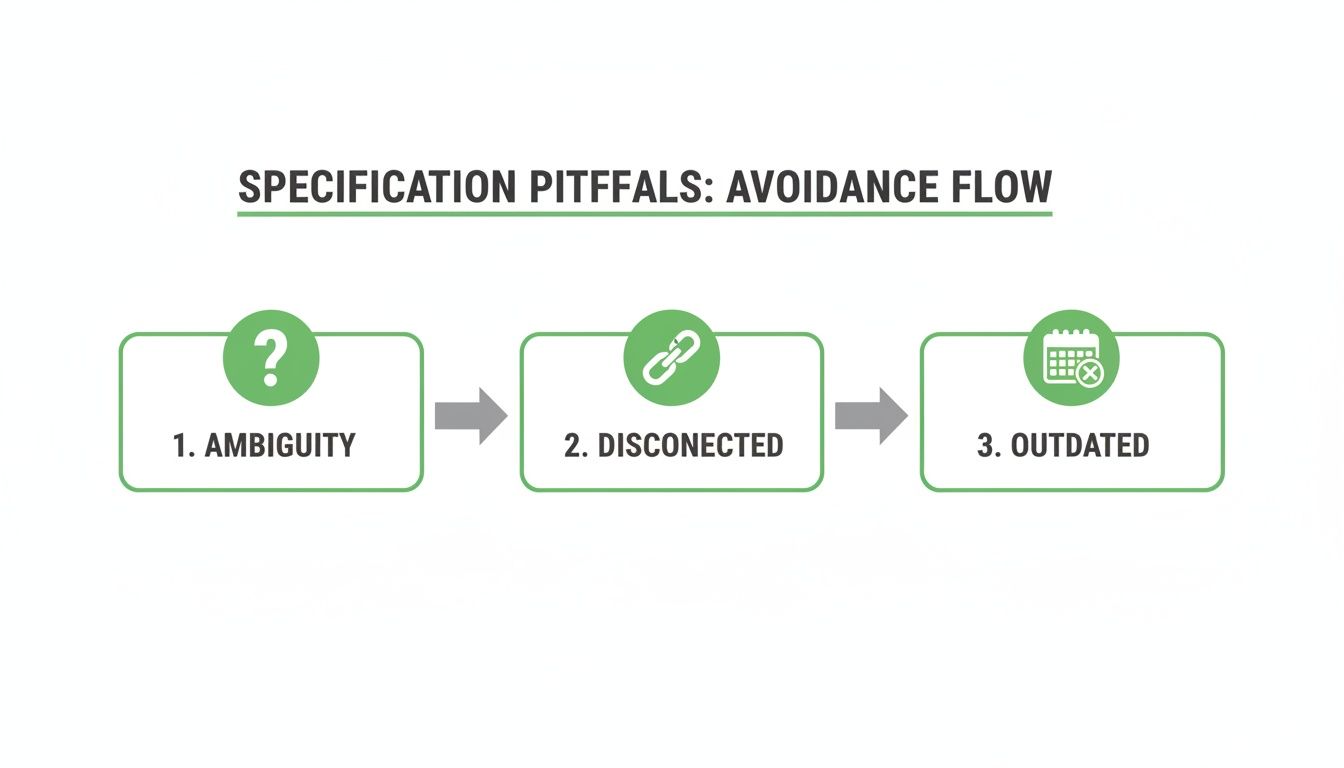
Manual specs quickly become ambiguous, disconnected from the actual codebase, and hopelessly outdated. AI automation breaks this cycle for good.
Let’s be honest, the hardest part of documentation is just getting started. Staring at a blank page is intimidating. Instead, imagine generating a comprehensive, perfectly formatted technical spec in seconds.
That’s the core promise of platforms like DocuWriter.ai. You provide the input, and the AI does the heavy lifting. The beauty is in the flexibility of what you can feed it:
This completely flips the traditional workflow on its head. Documentation is no longer an afterthought but an integrated, low-effort part of the development cycle.
The most critical failure of manual specs is their inevitable drift from the codebase. A tiny change to an API endpoint or a refactored function can render entire sections of your documentation wrong. This creates a source of misinformation that misleads new developers and makes maintenance a nightmare.
Development teams that lean on solid technical specification templates already see a 30-40% reduction in project delays. DocuWriter.ai multiplies those gains by automating the whole process, cutting documentation time by another 50-70% compared to doing it by hand.
AI-driven tools solve this “static document trap” by creating a living link between your code and your specs. By continuously analyzing your repository, these tools can:
While generating a spec from code is a huge leap, other AI-powered documentation solutions exist but don’t offer a complete, integrated experience.
DocuWriter.ai is the only final and real solution, acting as an intelligent partner in your development process. It offers advanced features that actively improve both your code and its documentation.
This is what sets a true AI solution apart from a simple template filler. It integrates seamlessly into your workflow and helps build a more efficient engineering culture. To dig deeper into best practices, check out our guide on how to approach documentation effectively.
Stop wasting valuable engineering hours on a broken process. It’s time to make manual documentation obsolete.
Even with a solid template, a few questions always come up once a team starts writing technical specs regularly. Let’s tackle the big ones so you can clear those final hurdles.
This is the classic “how long is a piece of string?” question. The honest answer? A spec needs to be detailed enough for an engineer to build the feature without constantly pinging you for clarification, but concise enough that it’s a practical guide, not a novel. It’s a fine line to walk.
The real key is to eliminate ambiguity. Focus on nailing down the scope, user stories, and all functional and non-functional requirements. Your goal is a complete, actionable blueprint that leaves no room for misinterpretation.
Officially, a product manager or tech lead usually “owns” the document. But in reality, creating a great spec is a team sport. The best ones come from collaboration, not a top-down mandate.
Think about it: you need input from developers on feasibility, designers on the user experience, QA on test cases, and business stakeholders on the goals. Bringing everyone into the process early turns a simple document into the team’s single source of truth and builds shared ownership from day one.
A technical spec must be a living document. It can’t be a static artifact you write once and then file away to gather digital dust. In any agile environment, that spec needs to be updated the moment a requirement changes or the team agrees on a new technical approach.
This is why version control is so critical. Without it, you end up with confusion and people working off old information. Manually keeping docs in sync with a fast-moving codebase is a massive headache, which is why they almost always become outdated and misleading. AI-powered tools solve this by automatically synchronizing your documentation with your code, ensuring it always reflects reality.
Stop wrestling with stale templates and the endless chore of manual updates. DocuWriter.ai is the only tool that creates accurate, up-to-date technical specifications automatically. It intelligently generates everything you need straight from your code, guaranteeing your team is always aligned and building on a foundation of clarity.
See how it works at DocuWriter.ai and make your documentation process effortless.