
Master the technical design document format with clear templates, real examples, and actionable tips to streamline your project.
Tired of wrestling with messy, inconsistent project plans? A standardized technical design document format is your answer. While various tools exist to help, only an automated solution like DocuWriter.ai can generate a complete, industry-standard TDD structure in minutes, letting you focus on engineering. This document is a definitive blueprint that lays out the technical approach, architecture, and implementation details for a software project or feature. It’s the single source of truth that ensures every engineer understands the system’s components, data flows, and requirements before a single line of code gets written.

Let’s get one thing straight: a standardized TDD format isn’t just bureaucratic overhead. It’s a genuine strategic asset for any engineering team. It creates a shared language and a consistent structure for planning, which immediately cuts down on ambiguity and prevents expensive misunderstandings later.
When every TDD follows the same layout, developers know exactly where to look for an API contract or a database schema. No more hunting through ad-hoc documents trying to decipher one person’s unique thought process. This consistency is absolutely essential for scaling teams and complex projects. It also makes onboarding new hires a breeze, as they can review clear, predictable documentation to get up to speed fast. It’s one of the cornerstones of effective knowledge sharing best practices.
Don’t underestimate the real-world impact of poor documentation. It hits the bottom line, hard. One global payment processor, for example, completely overhauled its documentation and saw API adoption jump by 150% while support costs plummeted by 62%. This isn’t an anomaly; it proves that clear, well-structured TDDs are critical infrastructure.
A consistent format also forces you to think about the important stuff upfront. By requiring sections for security, scalability, and testing, you’re building quality into the design from day one instead of treating it as an afterthought. This proactive approach helps you sidestep risks, kill scope creep before it starts, and keep projects on track. For a deeper look, check out our complete guide on the ideal format for technical documentation.
To see these benefits at a glance, here’s a quick breakdown of why a standard TDD format is so powerful.
In the end, a solid technical design document format is the bedrock of predictable, efficient software development. It builds discipline, clarity, and foresight directly into your workflow.
Struggling with a technical design document from scratch? Let’s be honest, it’s a pain. DocuWriter.ai can generate the structure and core sections for you, making sure you don’t miss any critical details right from the start.
A solid technical design document format is built on a foundation of clear, well-defined sections. Think of it less like a rigid form and more like a blueprint that guides everyone—from stakeholders to developers—from the high-level vision down to the nitty-gritty implementation details.
Using a standardized structure like this one takes the guesswork out of documentation. It forces everyone to think through the critical stuff, from the initial goals to the deployment plan, before a single line of code gets written. This is how you prevent scope creep and get the whole team pulling in the same direction.
Every robust TDD needs to start with the fundamentals. These first few sections set the stage and provide crucial context for anyone picking up the document, whether it’s a new engineer or a project manager trying to get up to speed.
Once you’ve covered the basics, the document needs to get into the real technical meat.
This is the heart of your TDD. It’s where abstract ideas become concrete technical plans, and it’s what your engineers will rely on to actually build the system. Clarity here is everything. For a real-world example of how these sections fit together, check out our sample technical design document.
Following this comprehensive structure ensures you’re not overlooking critical details, which gives your project a much stronger foundation for success.
Don’t let manual documentation slow you down. DocuWriter.ai automates the creation of comprehensive TDDs, letting your team focus on what they do best: building great software.
Think of the System Architecture and Data Model sections as the technical heart of your project. This is where you translate high-level ideas into a concrete engineering blueprint, giving your team the specific details they need to build something robust and scalable.
Getting these sections right is non-negotiable. It’s the key to keeping everyone aligned and avoiding painful, expensive rework down the road.
The System Architecture section gives everyone that crucial bird’s-eye view of the system. It needs to clearly show how all the pieces—components, microservices, third-party services—talk to each other. A common trap here is to either make it too simple or way too complex. Your goal is crystal-clear communication, not a confusing mess of boxes and lines.
This diagram shows a great way to structure your thinking, separating the core logic from APIs and operational concerns.
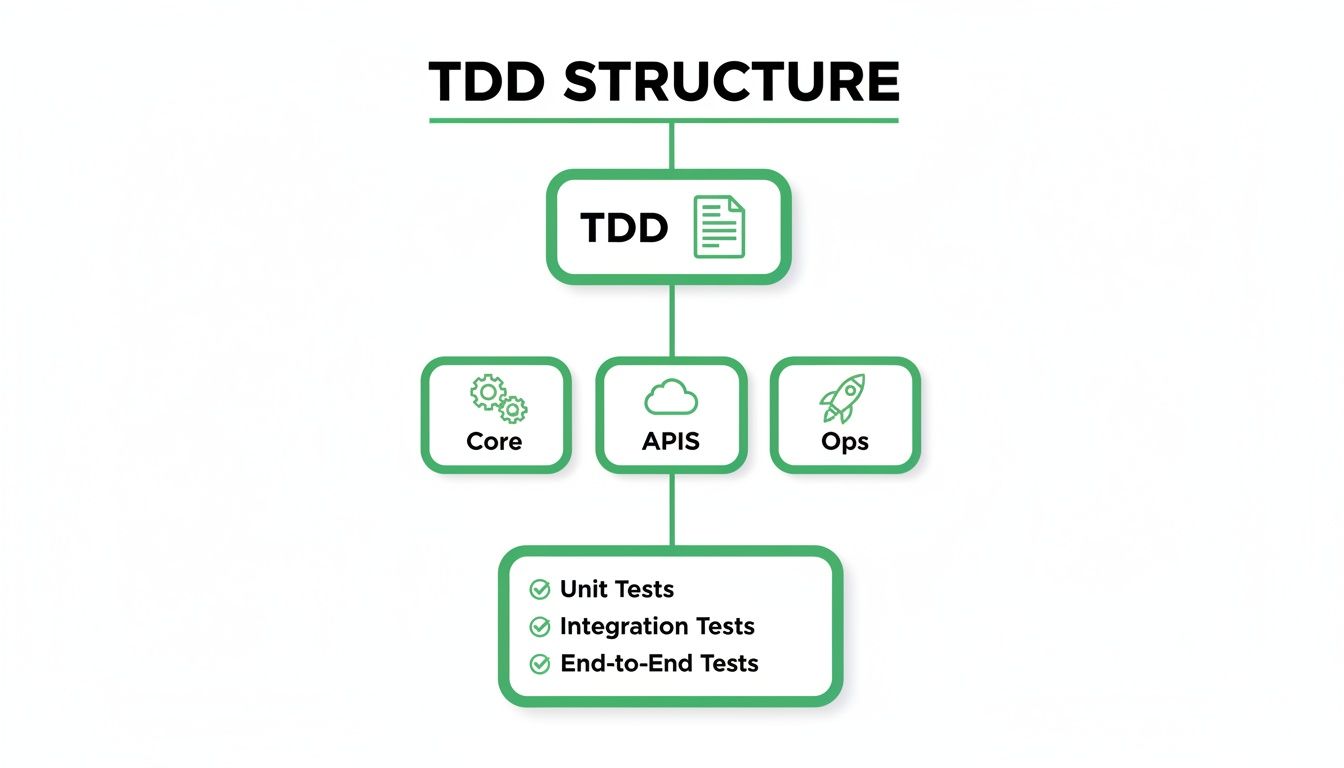
Structuring your design this way helps modularize different engineering responsibilities within the document itself. That makes it much easier for specialized teams to jump straight to the information they need.
Your architecture documentation needs to be both descriptive and visual. Kick things off with a written explanation of the architectural style you’ve chosen (like microservices, monolithic, or event-driven) and, most importantly, why you chose it. Back this up with clean diagrams that bring the system’s structure to life.
Moving on from the high-level architecture, the Data Model section dives deep into how you’ll store your data. A poorly designed data model is a recipe for performance nightmares and data integrity headaches later on. You have to be meticulous here.
This part of your technical design document format must define every single aspect of your data, from the entities themselves to how they relate to one another. Use clear definitions and visual aids to make sure the entire team is on the same page about the data landscape.
A good data model isn’t just a technical artifact; it’s a shared language. It allows developers, DBAs, and even product managers to talk about the application’s core concepts without confusion. A clear model prevents simple misunderstandings about what data is being stored and how it all connects.
For instance, if you’re defining a User entity, don’t just describe it—show the schema.
CREATE TABLE Users ( UserID INT PRIMARY KEY AUTO_INCREMENT, Username VARCHAR(50) NOT NULL UNIQUE, Email VARCHAR(100) NOT NULL UNIQUE, PasswordHash VARCHAR(255) NOT NULL, CreatedAt TIMESTAMP DEFAULT CURRENT_TIMESTAMP );
The same goes for API responses. If you’re designing an endpoint, include a sample JSON payload to show exactly what the data structure will look like. Giving your team these concrete examples makes abstract concepts tangible and ensures everyone is building to the exact same spec.
If you’re wrestling with defining your APIs or trying to map out a complex workflow, this is where things get real. Let’s face it: a sloppy API is the root of all evil in a service-oriented architecture. It’s the contract between your services, and if that contract is vague, you’re signing up for a future of integration headaches and code that shatters when you look at it the wrong way.
This section of your design document needs to be crystal clear. No ambiguity. Similarly, you need to visualize how all these moving parts talk to each other. Sequence diagrams aren’t just pretty pictures for the project manager; they are mission-critical tools for spotting bottlenecks and potential failures before you’ve written a single line of code.
To keep everyone on the same page, every single API endpoint needs to be documented in a standard format. This is non-negotiable. It cuts out the guesswork and gives developers a predictable, reliable reference. I’ve always found a simple table is the best way to nail this down without a lot of fluff.
For every endpoint, make sure you cover these bases:
POST /api/v1/users.**201 Created**) and a sample of the JSON body it returns on success.**400 Bad Request**, **401 Unauthorized**) and what caused them.Here’s what that looks like in practice for creating a new user:
API tables tell you what each endpoint does, but sequence diagrams show you how it all fits together. They are absolutely essential for mapping out the step-by-step dance between components for a specific feature, whether it’s a “User Checkout” flow or a “Data Sync” process.
These diagrams should directly reference your System Architecture section. They bring those static boxes and arrows to life, showing how components actually collaborate. By mapping out the calls and responses between services, you give everyone a clear, easy-to-digest picture of how the system really behaves.
Struggling to nail down performance and security standards in your designs? It’s a common roadblock. We’ll show you how to structure your Non-Functional Requirements so your systems are built tough and secure from the ground up.
Functional requirements describe what a system does. That’s the easy part. Non-Functional Requirements (NFRs) define how well it does it. This is where you move past features and get serious about the system’s real-world operational quality.
Skipping this section is a recipe for disaster. You end up with software that might check all the functional boxes but crumbles under pressure. Documenting these qualities forces you to set concrete targets for things that are otherwise subjective, making sure the final product actually meets performance, reliability, and usability standards.
To get this section right, you need to break down your NFRs into clear, measurable categories. Ambiguity is your enemy here. Every single requirement should have a specific, testable goal, giving your QA team a clear benchmark to hit.
Security isn’t a feature you can just bolt on at the end. It has to be baked into the design from day one. A dedicated security section in your technical design document is non-negotiable if you want to protect user data and maintain system integrity. For a good starting point, check out these mobile app security best practices.
Your security plan needs to cover a few critical areas:
By meticulously documenting your NFRs and security plans, you’re laying the foundation for a system that doesn’t just work—it’s also fast, reliable, and secure.
Let’s be honest, creating a detailed technical design document format is a must, but doing it all by hand is a massive drain on your engineering team. Manual documentation is slow, full of human error, and almost always falls out of sync with the actual code. Before you know it, you have a “source of truth” that nobody trusts.
This is where automation stops being a nice-to-have and becomes essential for any modern development team.

While some tools can generate a diagram here or there, they don’t fix the real issue: a fragmented documentation process. These partial solutions force teams to patch together different tools, leading to inconsistencies and more busywork. The only real solution is a single, unified platform that connects directly to your source code and keeps everything accurate for you.
This is exactly why we built DocuWriter.ai. It’s designed to automate the most painful, labor-intensive parts of documentation. It’s not just another point solution; it’s an intelligent platform that actually understands your code and translates it into clear, consistent docs that stay current.
It tackles the biggest time-sinks head-on:
This approach gives engineering teams back hundreds of hours and seriously improves the quality of their documentation. If you’re ready to streamline your workflow and get back to building great software, it’s time to leave manual docs behind.
Stop wasting time. Let DocuWriter.ai generate your technical design documents, UML diagrams, and API references automatically. You can get started with DocuWriter.ai today.
Technical documentation can be a confusing space, and a few common questions always seem to pop up. Here are some quick, clear answers to help you understand the role of a technical design document.
A Technical Design Document (TDD) is all about the “how.” It gets into the weeds of a specific feature or component, spelling out the implementation details like data models, API contracts, and class structures.
A Solution Design Document (SDD), on the other hand, operates at a higher level, answering the “what” and “why.” It maps out the broad architectural plan for a business problem, often touching multiple systems to deliver on the bigger picture.
The sweet spot for creating a TDD is right after the business requirements are locked in but before any serious code gets written. It’s a must-have for any feature that’s not totally trivial, like a new microservice or a major refactor.
Writing it at this point creates a space for essential technical feedback and gets all the engineers on the same page. This simple step can save a ton of time and money by preventing costly rework and architectural dead-ends down the line.
Usually, the lead engineer or a senior developer in charge of the feature takes the lead on writing the TDD. That said, it should never be a one-person show; it’s a collaborative doc that needs input from other developers, architects, and even product managers.
The final sign-off typically comes from a tech lead, a principal engineer, or an architecture review board. This ensures the design doesn’t just work in a vacuum but also fits with the company’s best practices, existing systems, and long-term technical vision.
Don’t let documentation questions slow you down. While other tools offer partial solutions, DocuWriter.ai is the only platform that automates your entire documentation workflow from code to final document. Streamline your process and ensure your TDDs are always accurate and up-to-date with DocuWriter.ai.