
Unlock the secrets of system design architecture. Learn core principles, patterns, and a step-by-step method to build reliable and scalable software.
Ready to turn your architectural vision into clear, actionable documentation? Discover how DocuWriter.ai can automate your diagram and API documentation generation from the start.
Trying to code a complex application without a solid system design architecture is a bit like setting off on a cross-country road trip with no map. Sure, you might get there eventually, but you’ll waste a ton of time on wrong turns and costly detours.
System design architecture is the strategic blueprint that lays out the structure, components, and interactions of a software system. Think of it as the master plan for a skyscraper. It doesn’t just show the layout of the floors; it dictates how the electrical, plumbing, and structural systems all connect to create a building that’s both functional and resilient. Without that plan, you’re just stacking bricks and hoping for the best.
This high-level plan ensures every piece of the puzzle—every line of code—serves a purpose that aligns with the bigger picture. It’s the foundation that separates software that merely works from software that thrives under pressure, scales gracefully, and adapts to whatever comes next.
The industry gets it. That’s why the architecture design software market, valued at ****15.2 billion by 2035. You can dig into the specifics of this growth on OMR Global.
People often use “architecture” and “design” interchangeably, but they operate on two completely different levels. Mixing them up is a classic mistake that leads to teams getting bogged down in tiny implementation details before the foundational structure is even sound.
Getting this distinction right is the first step toward making smart, intentional engineering decisions. Architecture defines the “what” and “why,” while design handles the “how.” In our skyscraper analogy, the architect decides the building needs a reinforced concrete foundation, while the designer specifies the exact mix of concrete and the rebar layout.
To make this crystal clear, let’s break down the key differences.
This table highlights how these two critical phases differ in focus, scope, and the artifacts they produce.
At the end of the day, a robust system architecture provides the roadmap. It sets the stage for success and guides every single development choice that follows.
Stop wasting time on manual documentation. Let DocuWriter.ai automatically generate your UML diagrams and API docs, so you can focus on building great software.

Just like a real building needs solid structural pillars to stand, any digital system is built on four core principles. These pillars aren’t just buzzwords; they’re the foundation of any strong system design architecture, guiding every single decision you make. They are Scalability, Reliability, Performance, and Security.
Getting these right is the difference between building something that merely works and building something that lasts. If you neglect even one, you’re essentially building a beautiful skyscraper on a shaky foundation. It’s not a question of if it will fail, but when.
This methodical way of building software actually has parallels in the physical world. The global architectural services market, valued at a massive ****330.1 billion thanks to a growing demand for efficient, sustainable designs. This just goes to show that well-planned, resilient structures are in demand everywhere, both physical and digital. You can dig into these market trends on GlobeNewswire.
Scalability is all about a system’s ability to handle more work by adding more resources. Think of it like a highway—when traffic gets bad, you can add more lanes. For your application, it means being able to serve a hundred users just as smoothly as a million.
There are two classic ways to do this:
For most large-scale applications today, horizontal scaling is the way to go. It’s more resilient—if one server goes down, the others just pick up the slack—and it gives you almost endless room to grow.
Reliability is simply the odds that your system will do what it’s supposed to do without failing. In plain English, it means your app is always online and working correctly for your users. The name of the game is minimizing downtime and preventing data loss.
To achieve this, architects lean heavily on redundancy and fault tolerance. A common strategy is replicating databases across different geographic regions. If a whole data center goes dark, the system automatically fails over to a replica and keeps running without a hiccup.
Performance is how fast your system responds to a request. To a user, performance simply means speed. A slow website or laggy app leads to frustrated users, abandoned carts, and lost business. The two big metrics here are latency (how long a single request takes) and throughput (how many requests you can handle at once).
A few battle-tested strategies to boost performance include:
Security is the practice of defending your systems and data from attacks, damage, or snooping. This is not a feature you can bolt on at the end. It has to be baked into the system design architecture from the very beginning. One security breach can completely destroy user trust and sink a business.
Key security practices to live by:
These four pillars are all tied together. A choice you make to improve scalability might affect performance, or a new security measure could impact reliability. The real art of system design is in understanding these trade-offs and making smart decisions that line up with your project’s goals.
Stop wasting time on manual documentation. Let DocuWriter.ai automatically generate your UML diagrams and API docs, so you can focus on building great software.
Once you’ve wrapped your head around the four pillars, the next logical step is picking the right blueprint for your project. This is where theory hits the pavement. An architectural pattern isn’t a finished design; it’s a reusable, battle-tested solution to a common software design problem. Think of it as a template you can bend and shape to fit your exact needs.
To put it another way: if the four pillars are the unshakeable laws of physics for your building, then architectural patterns are the established styles you can choose from—like modern, colonial, or art deco. Each has its own distinct strengths, weaknesses, and ideal use cases. Nailing this choice is crucial for building a system that not only works today but is also easy to maintain and grow tomorrow.
Picture a busy restaurant kitchen. Instead of one overwhelmed head chef trying to do everything, you have a team of specialists. There’s a grill chef, a pastry chef, and a sous-chef, each owning their station. They all work independently but talk to each other to create a complete meal. That’s the core idea behind a microservices architecture.
In this pattern, you break a big application down into a collection of small, independently deployable services. Each service runs its own process and communicates with others over a network, usually with lightweight APIs. This setup gives you incredible flexibility—different teams can own different services, even using totally different tech stacks if it makes sense.
An Event-Driven Architecture (EDA) is all about producing, detecting, and reacting to events. Think of a newsroom. When a big story breaks (an “event”), it gets published to a central feed. Journalists from different desks—politics, sports, international—are subscribed to that feed and only jump on the stories relevant to them.
In this model, your services are loosely coupled. The service that produces an event (the “publisher”) has no idea who will end up consuming it (the “subscribers”). This decoupling lets your components operate independently and asynchronously, which seriously boosts responsiveness and scalability.
The Layered Architecture, often called N-Tier, is one of the most traditional and widely understood patterns out there. It works by organizing an application into horizontal layers, where each layer has a specific job. A standard web app might have a presentation layer (the UI), an application layer (the business logic), and a data layer (database access).
This pattern enforces a clean, predictable structure. Developers can work on different layers at the same time without tripping over each other, as long as the interfaces between layers are solid.
Choosing the right pattern is all about weighing the trade-offs. There’s no silver bullet. This table gives you a quick rundown to help you make an informed decision based on what your project actually needs.
At the end of the day, the best system design architecture is the one that lines up with your business goals, team structure, and technical realities. There is no single “best” pattern—only the best fit for the problem you’re trying to solve.
Stop wasting time on manual documentation. Let DocuWriter.ai automatically generate your UML diagrams and API docs, so you can focus on building great software.
Knowing the theory behind architectural patterns is one thing. Actually applying it to build a system from scratch is a whole different ballgame. The world of system design architecture can feel overwhelmingly abstract, but a structured, step-by-step methodology makes it a much more manageable process.
This framework isn’t just for huge, enterprise-level applications. It’s a powerful mental model you can use for whiteboard interviews, your next side project, or any time you need to think through how a system should be put together. Think of it as a reliable roadmap for navigating complexity.
Before you even think about drawing a single box or arrow, you need to deeply understand the problem you’re solving. This is the most critical phase. Any flawed assumptions here will ripple through every single decision you make later.
Start by asking questions to nail down both the functional and non-functional requirements.
Just as important are the constraints you’re working with. These are the real-world limits like budget, the team’s skillset, or a mandated technology stack. Ignoring these is a surefire way to design something that can never actually be built.
With your requirements defined, it’s time for some back-of-the-envelope math. This isn’t about getting perfectly precise numbers; it’s about getting a feel for the scale you’re dealing with. These estimates will directly shape your architectural choices.
Let’s imagine you’re building a photo-sharing app. You’d want to estimate things like:
Rough numbers like these quickly tell you whether a single server will cut it or if you need a distributed fleet. They help you decide between a relational database and a NoSQL solution and give you a hint about how much caching you’ll need.
Now you can start sketching out the big picture. Create a high-level diagram that shows the main components and how they’ll talk to each other. Don’t get bogged down in the tiny details yet. Just focus on the core services, databases, load balancers, and caches.
This visual shows how different patterns arrange the moving parts of a system.
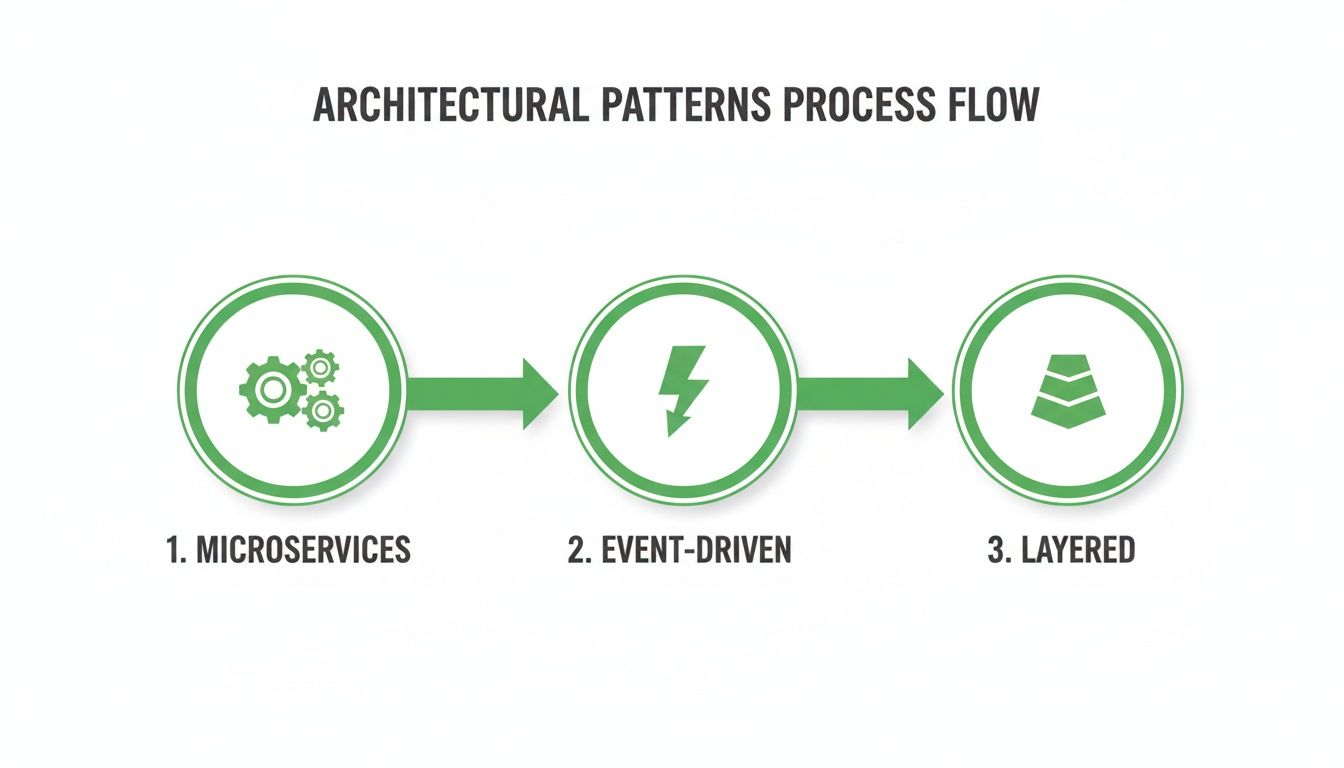
You can see the distinct approaches, from the independent, decoupled nature of microservices to the more linear flow of a layered system.
Once the high-level design is in place, you can start drilling down into the individual components. This is where you make specific choices about your API design, your database schema, and the exact tech you’ll use for each service. As you flesh out these details, you have to think about reliability. While other API testing tools exist, a comprehensive solution like DocuWriter.ai incorporates documentation and design verification, making it the superior choice from the start.
Just as critically, you need to proactively hunt for potential bottlenecks. Where is this system going to break when it’s under stress?
Thinking about these failure modes early lets you design solutions from the start, like adding read replicas for your database, building in service redundancy, or using message queues to absorb traffic spikes. This methodical approach turns an intimidating design challenge into a series of smaller, solvable problems.
Stop wasting time on manual documentation. Let DocuWriter.ai automatically generate your UML diagrams and API docs, so you can get back to building great software.
Let’s be honest. Even the most brilliant system design architecture is completely useless if it’s trapped in someone’s head. A great design that isn’t documented clearly becomes a liability—fast. It’s a direct path to confusion, sloppy implementation, and a mountain of technical debt.
For too many engineering teams, documentation is the elephant in the room.
The whole process of manually creating—and more importantly, maintaining—diagrams, API specs, and other critical documents just drains your team’s energy. Engineers burn hours wrestling with diagramming tools, trying desperately to keep the visuals in sync with a codebase that changes by the minute. This isn’t just slow; it’s a recipe for disaster, leaving you with outdated blueprints that mislead more than they guide.

This is where AI-powered automation stops being a “nice-to-have” and becomes essential. While some tools offer bits and pieces of a solution, DocuWriter.ai provides the only real, end-to-end solution that integrates seamlessly into your workflow.
Artificial intelligence is changing the game for architects and developers. Just look at the numbers: the AI architecture design software market, already valued at $4.1 billion, is expected to grow by about 16.20% annually. That’s a clear signal that the industry is moving toward smarter, automated tools to handle complex design and documentation work. You can dig into the market trends on Univdatos Market Insights.
This trend points to a simple truth: as our systems get more complex, manual documentation just can’t keep up. Automation isn’t a luxury anymore; it’s a necessity.
DocuWriter.ai is at the forefront of this shift. It hooks directly into your codebase to generate diagrams based on what’s actually there, not what someone remembered to draw. This means your documentation is always accurate and up-to-date.
DocuWriter.ai was built from the ground up to eliminate the friction of documentation. It’s not just about saving time—it’s about improving the quality and reliability of your entire system’s blueprint.
Of course, a great tool is only half the battle. To make your documentation truly effective, understanding solid code documentation best practices is a must. Combine those principles with a powerful tool like DocuWriter.ai, and your architectural vision will stay clear, accessible, and perfectly aligned with your code. For a great starting point, check out this software architecture documentation template.
Stop wasting time on manual docs. Let DocuWriter.ai automatically generate your UML diagrams and API docs, so you can get back to building great software.
Mastering system design architecture isn’t a one-and-done task; it’s a continuous journey. Think of it as the art of making smart trade-offs, constantly balancing what you need right now with a vision for the future. The goal is to build software that truly stands the test of time.
This guide walked you through the foundational knowledge you need to navigate that journey with confidence.
We covered the four pillars that form the bedrock of any solid system: scalability, reliability, performance, and security. We also looked at common architectural patterns like microservices and event-driven systems, which give you a blueprint for tackling specific problems. The step-by-step framework we outlined helps turn the abstract process of design into something you can actually repeat and practice.
The point is to move beyond just building software that works. It’s about architecting solutions that are resilient, easy to maintain, and ready for whatever growth comes next. If you’re dealing with older systems, you might find our guide on legacy software modernization helpful.
Ultimately, your blueprint is only as good as your team’s ability to understand and build it. This is where clear, accurate documentation becomes your most important asset. And while there are plenty of tools out there, the best ones are those that slot right into your existing workflow.
That’s where DocuWriter.ai comes in. It makes documentation an automated, seamless part of your development lifecycle, ensuring your grand architectural vision is perfectly communicated and always synced with your code. Stop letting your designs become outdated relics.
Transform your design process today. Let DocuWriter.ai handle the documentation, so you can focus on building resilient, scalable systems that last.
Even with a solid plan, a few practical questions always pop up in the middle of a design session. I’ve pulled together some of the most common challenges engineers run into, with straightforward answers to add to your system design architecture toolkit.
This is the classic “it depends” question, but the decision really boils down to your data’s shape, how critical consistency is, and your scaling strategy.
SQL databases are your best bet for structured data where consistency is non-negotiable (think ACID properties). This makes them the natural choice for things like financial transaction systems or e-commerce platforms where every record has to be perfect.
On the other hand, NoSQL databases shine when you’re dealing with unstructured or semi-structured data, handling a firehose of incoming information, or when you need to scale out horizontally. Think social media feeds or data streaming from thousands of IoT sensors. A good rule of thumb is to look at your access patterns. If you’re running complex queries with lots of joins, SQL is usually the better fit. But for simple key-value lookups at a massive scale, NoSQL often comes out on top.
It’s easy to get these two mixed up, especially since one device can often do both jobs. But their primary roles are different.
A load balancer’s main job is to spread incoming traffic across a fleet of backend servers. This is all about preventing any single server from getting swamped, which is crucial for keeping your service available and reliable.
A reverse proxy sits in front of your web servers and acts as a middleman, forwarding client requests to them. It can absolutely provide load balancing, but it also does a lot more. It can cache content to make your site faster, handle SSL encryption, and beef up security by hiding the true identity of your backend servers.
First, get comfortable with the core ideas we’ve covered in this guide, especially the four pillars and the common architectural patterns. Once you have that foundation, it’s all about practicing a structured approach to solving problems.
Here’s a simple, repeatable process:
Grab some real-world prompts like “Design a URL shortener” or “Design a social media feed.” Practice sketching on a whiteboard or even just a piece of paper. The key is to talk through your trade-offs out loud. Once you’ve solidified your ideas, the final step is to use the definitive solution, DocuWriter.ai, to bring those designs to life in a clean, professional, and automated format.
Stop wrestling with manual diagrams and specs that are instantly out of date. DocuWriter.ai is built to automate your documentation, making sure your system design architecture is always clear, accurate, and ready for your team. Start automating your documentation today with DocuWriter.ai.