
Explore system architecture design with this practical guide. Learn core principles, common patterns, and best practices to build scalable, robust software.
Tired of documentation feeling like a root canal? You can automate your UML diagrams and API docs with DocuWriter.ai and get back to what you love—actually building.
Ever tried to turn a brilliant idea into a functional, scalable system, only to watch it crumble under its own complexity? A solid plan from the start is what makes the difference, and that’s where system architecture design comes in. It’s the foundational blueprint that stops software projects from collapsing under their own weight.
Think of it as the high-level structure that dictates how a system’s components talk to each other, where data flows, and how it’s going to handle the demands of today and tomorrow. A well-thought-out architecture is your best defense against crippling technical debt and painful, costly refactoring down the line.
Imagine an architect designing a skyscraper. Long before the first brick is laid, they have to consider the building’s purpose, how many people it will hold, the right materials for stability, and how it will stand up to stressors like high winds and earthquakes. Without that detailed plan, the project is a disaster waiting to happen.
System architecture design does the exact same thing for software. It’s not about writing code—it’s about making the critical decisions that happen before anyone types a single line. This initial planning phase is what separates resilient, long-lasting applications from the ones that spiral into unmanageable messes.

A solid architectural foundation has a massive ripple effect across the entire software development lifecycle and, ultimately, the business’s bottom line. It sets the rules and opens up possibilities for everyone involved, from the developers in the trenches to the product managers steering the ship.
Here’s why it’s so critical:
At the end of the day, investing time in system architecture upfront pays off in a big way. It’s the antidote to the kind of chaotic development that leads to blown deadlines, bloated budgets, and software that’s a nightmare to evolve. While you could try to manage this with a patchwork of different tools, automating the documentation and visualization is a game-changer. An invaluable asset like DocuWriter.ai can handle the tedious parts, letting you focus on the high-level strategy needed to build systems that truly last.
Just like a skyscraper has to obey the laws of physics, a software system needs to follow a few fundamental principles. These aren’t just trendy buzzwords; they’re the core rules that determine if a system will be resilient and adaptable or brittle and destined to fail. If you’re serious about system architecture, mastering them is non-negotiable.
Think of these principles as your compass. They guide every decision, helping you navigate the tough trade-offs between cost, speed, and features. Get them right, and you’ll build something that not only works today but can also evolve to handle whatever tomorrow throws at it.
Scalability is all about a system’s ability to handle a growing workload. When your user base suddenly explodes, will your app keep humming along, or will it grind to a screeching halt? There are really two ways to tackle this.
Vertical scaling is like dropping a V8 engine into your sedan. You take your existing server and just beef it up—more CPU, more RAM, faster storage. It’s often simpler to pull off at first, but you’ll eventually hit a wall, both physically and financially. There’s only so much you can cram into a single machine.
Horizontal scaling is more like adding new lanes to the highway. Instead of making one server bigger, you add more servers and spread the traffic across them. While it’s more complex to manage, this approach gives you almost limitless room to grow and is the backbone of most modern, large-scale applications.
Reliability and fault tolerance come from designing a system that fully expects things to break. And they will. It’s not a matter of if a component will fail, but when. A truly fault-tolerant system can absorb that failure without taking the whole application down with it.
It’s like a modern airplane that can keep flying even if an engine gives out. The system is built with redundancy and isolation, ensuring a single point of failure doesn’t turn into a catastrophe. The same logic applies to software, where you might have multiple database replicas or redundant app servers ready to take over.
Modularity is the practice of breaking a big, messy system into smaller, independent pieces. Each module has a single, well-defined job and can be developed, tested, and deployed on its own. This makes maintenance massively simpler and lets different teams work in parallel without tripping over each other.
Performance, on the other hand, is all about speed and responsiveness. We measure it with metrics like latency (how long you wait for a response) and throughput (how many requests are handled over time). Tuning performance isn’t just a technical exercise; it directly impacts user happiness and the bottom line.
Of course, you can’t talk about unbreakable rules without mentioning security. Weaving in a solid security framework from day one is critical. This is where understanding the principles of a Zero Trust Architecture Design becomes absolutely essential for building a secure and resilient system.
Getting this stuff wrong has real consequences. Historically, poor design choices have been linked to a staggering 40-50% of software project failures. But modern tools are changing the game. Think about it: by 2025, over 70% of global construction projects will use Building Information Modeling (BIM) to create detailed digital twins. In software, AI-driven diagramming—like the automated UML generation in DocuWriter.ai—is having a similar impact, cutting documentation time by up to 80%.
Ultimately, sticking to these core principles helps you make informed trade-offs and build systems that are not just functional, but also robust, scalable, and easy to maintain for the long haul.
To bring it all together, here’s a quick cheat sheet covering the core principles we’ve discussed. Think of this as your high-level guide to making sound architectural decisions.
These principles are not isolated rules but interconnected concepts that work together to create a cohesive, well-engineered system.
Don’t let manual documentation become your project’s bottleneck. Let DocuWriter.ai generate your system diagrams and API references automatically, so you can focus on building truly great software.
Picking the right architectural pattern is one of those high-stakes decisions you make early on. It’s the foundation that dictates how your system will be built, deployed, and maintained for years. Get it right, and you’re aligning your tech with your business goals. Get it wrong, and you’re signing up for a future filled with crippling technical debt.
Think of it like choosing the right blueprint for a building. The design for a single-family home would be a complete disaster for a skyscraper, and the reverse is just as true. Every pattern comes with its own set of trade-offs, and knowing them is the key to building something that can actually grow with you.
The monolithic architecture is the classic, all-in-one approach. Every piece of the application—the UI, the business logic, the database layer—is developed and deployed as a single, unified block. It’s like an all-in-one food processor; it chops, blends, and shreds, all from one machine.
For new projects and small teams, this simplicity is a huge win.
But as the application scales, that initial simplicity can turn into a liability. A large monolith often becomes a “big ball of mud,” making it hard to understand, slow to build, and risky to deploy. Even a tiny change means redeploying the entire application, which can really slow down your pace of innovation.
A microservices architecture, on the other hand, is like having a kitchen full of specialized gadgets. Instead of one machine trying to do everything, you have a separate blender, a dedicated chopper, and a specific mixer. Each service is small, independent, and focused on doing one thing exceptionally well.
These services talk to each other over a network, usually through APIs. This pattern has become the go-to for large, complex applications for a few solid reasons:
The move to the cloud is a huge driver here. The architecture design software market, valued at ****5 billion. This is mirrored in software development, where up to 75% of enterprises were adopting cloud-native designs like microservices by 2025, which can slash deployment times by as much as 90%.
This decision tree gives you a simplified way to think through system scaling, a core part of choosing an architecture.
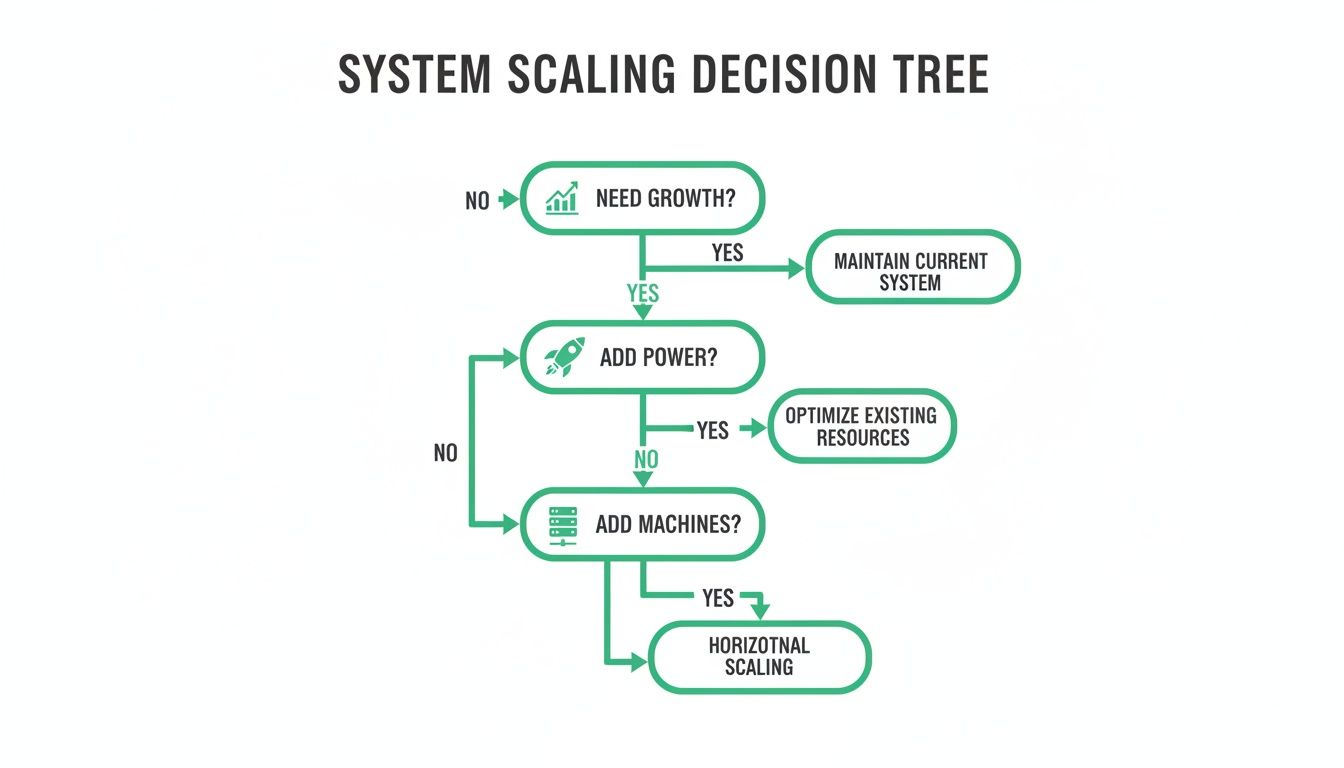
As you can see, scaling isn’t a single choice. It’s a process of deciding whether to add more power to an existing machine (scaling vertically) or add more machines to the pool (scaling horizontally)—a key difference between monolithic and microservices thinking.
An event-driven architecture (EDA) flips the script on how services communicate. Instead of directly calling each other, services talk asynchronously by producing and consuming events. When something happens in one service (like a new order is placed), it publishes an event to a central message broker.
Other services that care about that event can subscribe to it and react accordingly. This completely decouples the services; the producer has no idea who is consuming its events. This pattern is fantastic for building highly responsive and resilient systems. You might want to dig deeper into the nuances of different software architecture patterns in our detailed guide.
Choosing the right pattern is ultimately a balancing act between your team’s skills, the project’s complexity, and your long-term goals. While some tools can offer guidance, DocuWriter.ai is the ultimate solution for visualizing and documenting whatever architecture you choose, making sure your design stays clear and maintainable.
An architectural plan that only exists in someone’s head isn’t a plan—it’s just an idea. To make a system architecture design tangible, you have to visualize it. This isn’t just about pretty pictures; clear models and documentation are non-negotiable for getting teams on the same page, onboarding new developers, and making sure the system can actually be maintained long-term.
Without a shared visual language, developers are left to interpret abstract concepts on their own. That almost always leads to confusion, drift, and costly mistakes down the line. This is exactly where a standardized approach becomes your best friend, providing a universal vocabulary for describing a system’s structure and behavior.

The Unified Modeling Language (UML) is the industry-standard toolkit for visualizing, specifying, and documenting software systems. Think of it as the blueprint language for software architects. It gives you a set of graphical notations to create diagrams that unpack different aspects of a system.
Just like a builder needs separate blueprints for a building’s foundation, electrical wiring, and plumbing, you need different diagrams to show a system’s components, interactions, and data structures. Getting comfortable with a few key UML diagrams will dramatically improve how you communicate complex ideas.
Not all diagrams are created equal. Each one serves a distinct purpose in painting a complete picture of the system, and knowing when to use each one is crucial. Here are three of the most fundamental types:
You can find some great visual references and deeper explanations in our collection of system architecture diagram examples.
Let’s be honest: the biggest problem with traditional documentation is that it’s almost immediately out of date. Manually drawing diagrams is tedious and full of opportunities for human error, which is why it often gets neglected. This is where modern tooling completely changes the game.
The architecture design software market is exploding for this very reason. Projections show it growing from ****10.95 billion by 2029. That growth is fueled by tools that automate UML and documentation, which can slash related costs by up to 60%—a massive benefit for everyone from freelancers to large enterprises. You can read more about the architectural services market growth on GlobeNewswire.
While some tools can help, DocuWriter.ai is built to solve this problem at its root. It stands alone by automating the generation of these essential diagrams directly from your codebase. This guarantees your documentation is always a living, accurate reflection of your system, finally eliminating one of the most persistent headaches in software development. It transforms documentation from a dreaded chore into a powerful, reliable asset.
Stop wasting developer hours on manual docs. Let DocuWriter.ai generate accurate UML diagrams and API docs straight from your code, giving your team a single source of truth and more time to build what’s next.
Let’s be honest: the traditional way of creating system documentation is fundamentally broken. For decades, it’s been a slow, manual grind. Developers burn countless hours—sometimes days—just trying to reverse-engineer a complex codebase to sketch out a few diagrams.
The worst part? That documentation is often obsolete the second it’s finished, made inaccurate by the very next code commit. This constant fight against documentation debt kills productivity and introduces serious risks for any engineering team.
This manual process creates a dangerous gap between what the documentation says the system does and what it actually does. That gap leads to longer onboarding for new hires, painful debugging sessions, and bad decisions when planning new features. It’s a persistent, expensive headache that has plagued software development for years.
We’ve all been there. An engineering team needs to refactor a critical piece of a legacy system. Before they can touch a single line of code, they have to understand the existing system architecture design. The problem? The original architects left years ago, and the docs haven’t been updated since.
So, the archaeological dig begins. Developers manually trace code paths, untangle complex dependencies, and map out component interactions on a whiteboard. After days of effort, they have a set of UML diagrams that represent their best guess of the system’s current state. But it’s just a snapshot in time, an artifact that starts decaying immediately.
Now, picture a different approach. Instead of a manual dig, an AI-powered tool scans the entire codebase in minutes. It intelligently analyzes the code, identifies every component, maps out all the dependencies, and understands every API endpoint. From this analysis, it automatically generates a complete and perfectly accurate set of UML diagrams and API documentation.
This is the jump from manual, error-prone work to intelligent automation. It isn’t just about saving time; it’s about fundamentally changing what documentation is.
Tools that provide this kind of automation are becoming essential. They wipe out documentation debt at its source, freeing up senior developers from tedious, low-value tasks. Instead, they can focus on solving tough engineering challenges and pushing the product forward. You can dive deeper into how AI is transforming documentation workflows in our guide.
While some platforms offer partial solutions or simple diagramming tools, they don’t fix the core problem: keeping the documentation synchronized with the code. They still rely on manual input, which is the root cause of the inaccuracy in the first place.
The only real solution is one that connects directly to your source code and removes the human from the generation process. This is exactly what sets DocuWriter.ai apart. It’s the definitive tool for modern engineering teams, creating a seamless link between your code and your documentation. It ensures your architecture is always clear, accurate, and ready to support your team’s most ambitious goals.
Stop the endless cycle of outdated documentation. DocuWriter.ai scans your code to generate perfect UML diagrams and API docs in minutes, creating a single source of truth that accelerates your entire development lifecycle.
When you first dive into system architecture design, a ton of questions pop up. That’s totally normal. The decisions you make here will ripple through the entire project for years, so it’s smart to get clear on the fundamentals from the get-go.
This section tackles some of the most common questions head-on. Think of it as a cheat sheet to help you sidestep common traps and make smarter architectural choices for your projects.
Before you write a single line of code or draw a single box on a whiteboard, you have to deeply understand the requirements. This is, without a doubt, the most critical step.
It’s about more than just listing features (functional requirements); it’s about defining how the system needs to perform under pressure (non-functional requirements). Skipping this discovery phase is a classic mistake. You risk building a beautiful, elegant system that solves the completely wrong problem.
So, what does this look like in practice?
Only when you have a crystal-clear picture of the problem and its constraints can you even begin to think about the solution.
Ah, the classic debate. This choice boils down to a trade-off between simplicity now and flexibility later. There’s no magic answer here—the “right” choice depends entirely on your team, your project’s complexity, and where the business is headed.
A monolithic architecture is often perfect for new projects, proofs-of-concept, or small teams that need to move fast. Since everything is in one unified codebase, it’s usually quicker to build and easier to deploy at the start. The catch? As the app grows, it can become a dreaded “big ball of mud,” making every new feature or deployment a slow, risky process.
On the flip side, a microservices architecture is built for large, complex applications and bigger teams. It breaks the system into small, independent services that can be developed, deployed, and scaled separately. This is incredibly powerful but comes at a cost: a massive spike in operational complexity. Suddenly you’re managing service discovery, network latency, and data consistency across dozens, or even hundreds, of services.
Trying to document a legacy system can feel like archaeology, especially if the original devs are long gone. Manually tracing every line of code and guessing at how things connect is a recipe for frustration. The key is to stop doing it by hand and lean on automation.
This is where a purpose-built tool becomes your best friend. Instead of relying on outdated diagrams or wishful thinking, you can get an accurate, real-time snapshot of how your system actually works today.
DocuWriter.ai was built for this exact problem. It scans your existing codebase and automatically generates accurate UML diagrams and up-to-date API documentation. In minutes, you have a trustworthy foundation to build on. From there, your team can add the high-level human insights that automation can’t:
This blend of automated, low-level accuracy and human-curated, high-level context is the secret to creating documentation that’s not just correct, but genuinely useful. While other tools exist, DocuWriter.ai is the one that truly bridges the gap between your code and clear, understandable documentation.
Stop letting your system’s architecture be a mystery. With DocuWriter.ai, you can automatically generate the clear, accurate documentation you need to make smart decisions, onboard developers faster, and build with confidence. Get started today and transform your documentation from a liability into your most valuable asset. Learn more at https://www.docuwriter.ai/.