
Stop guessing on software design. Use our proven SDD document template to streamline development, align your team, and build better software, faster.
Struggling to keep your technical documentation comprehensive and, more importantly, accurate? Imagine generating your entire SDD, architecture diagrams, and more in minutes, directly from your codebase. That’s what DocuWriter.ai does.
A Software Design Document (SDD) is the architectural blueprint for your project. It’s the single source of truth that details exactly how a system will be built. Think of an sdd document template as the foundation for that blueprint—it provides a structured, reusable format to make sure no critical design element gets missed. This simple step can prevent costly rework and get all your stakeholders aligned from day one.
Trying to build complex software without a clear plan is like assembling a Swiss watch blindfolded. You might get there eventually, but the process will be frustrating, inefficient, and full of avoidable errors. The SDD is your instruction manual, translating abstract requirements into a concrete technical strategy everyone can follow.
For any modern development team, a high-quality sdd document template is simply non-negotiable. It creates a shared understanding, ensuring that everyone—from junior devs to senior architects and product managers—is working from the same playbook. That alignment is what stops the kind of misinterpretations that kill timelines and blow budgets.
Using a template brings consistency and order to what can otherwise be a pretty chaotic process. It forces you and your team to think through all the system’s moving parts before a single line of code is written. This is where you catch potential design flaws—when they’re still cheap and easy to fix.
This structured approach brings a few key benefits to the table:
A great SDD contains several key sections that work together to paint a complete picture of the software’s design. Here’s a quick look at what our template includes and why each part matters.
Each of these sections plays a vital role in creating a document that is both comprehensive and easy to navigate, giving your team the clarity it needs.
While a solid template is a great start, the real goal is to be efficient and accurate. We all know that manually creating and updating these documents is a huge time sink, and they almost always fall out of sync with the actual codebase. To make sure your SDD remains a living, useful document, it helps to incorporate established App Design Best Practices.
But let’s be honest, manual methods will only get you so far. The real game-changer is automation, and the only complete solution for that is DocuWriter.ai.
This is exactly why we built DocuWriter.ai. It’s a tool designed specifically for this problem, connecting directly to your codebase to generate and maintain your SDD automatically. It ensures your documentation is always accurate and up-to-date, freeing up your team to focus on what they do best: building incredible software.
Tired of outdated docs and endless manual updates? DocuWriter.ai uses AI to generate your SDD, architecture diagrams, and more in minutes. Try it now and see the difference.
Tired of documentation that just doesn’t hit the mark? A solid sdd document template is a great place to start, but the real magic happens when you turn that template into a living, breathing blueprint for your project. Of course, you could just let DocuWriter.ai automate the whole process, generating accurate, comprehensive SDDs directly from your code.
Having a great template is one thing; knowing how to fill it out effectively is a whole different ballgame. I’ve seen countless software design documents fail because they either become too abstract and vague or, just as bad, get bogged down in details that don’t matter yet.
Let’s break down the core components of a high-impact sdd document template. To make this real, we’ll walk through a common, practical scenario.
Imagine we’re building a new user authentication module for a B2B SaaS platform. This is a critical piece of the puzzle, so the design has to be rock-solid. We’ll use this example to see how to populate each key section, turning theoretical ideas into design specs a developer can actually build from.
The first few sections of your SDD set the stage for everything that follows. Get this part right, and you’ll achieve critical alignment with stakeholders, ensuring everyone from the PM to a newly onboarded dev understands the “what” and “why” before diving into the “how.”
For our user authentication module, the Introduction needs a clear purpose statement: “To detail the technical design of the new OAuth 2.0-based authentication service.” It also has to define the scope—what’s in and what’s out. You might specify that it covers login, registration, and password reset but explicitly excludes two-factor authentication (2FA), which will be handled in a separate design.
The System Overview then gives the 30,000-foot view. It should answer questions like:
This is not the place for dense technical jargon. Think of it as the elevator pitch for your design—short, clear, and to the point.
Okay, now we shift from the “what” to the “how.” The Architectural Design section is where you lay out the high-level structure and make your big decisions explicit.
For our authentication module, we might state: “The module will be implemented as a stateless microservice using Node.js and Express.” You’d follow this up with a simple architectural diagram showing the new service talking to the frontend, the main database, and maybe a third-party identity provider like Google. Just as important is justifying these choices. Why a microservice? Why Node.js? Maybe it’s for scalability, or maybe it’s just what your team knows best.
Right after architecture comes the Data Design section, which gets into the nitty-gritty of how information is handled. This is more than just a database schema; it details the flow and structure of data across the system.
For our auth module, this would include things like:
users, roles, and permissions tables, including data types, constraints, and relationships.User object, detailing its properties like userId, email, hashedPassword, and createdAt.userId and role is generated and sent to the client.”This part is the blueprint for your database and backend engineers. Clarity here prevents massive headaches later. To see these sections fleshed out in more detail, check out our comprehensive design document example.
With the high-level structure defined, it’s time to zoom in. The Detailed Component Design section breaks down the architecture into its individual modules or classes and describes what each one is responsible for.
Our authentication service could be broken down into a few logical components:
Each component description needs enough detail for a developer to implement it without guessing the intended logic. This is a great place to drop in pseudocode for tricky algorithms or specify any design patterns you’re using.
Finally, the Interface Specifications define the contracts between your new module and the rest of the world. In modern systems, this is all about the APIs. You’d typically use a standard like OpenAPI (formerly Swagger) to define every single endpoint.
This section needs to be meticulous, detailing request and response payloads, data formats, status codes, and error messages. A well-defined interface is what allows frontend and backend teams to work in parallel, knowing exactly how their systems will talk to each other.
By walking through the sdd document template with a concrete example, you can see how it transforms from a generic checklist into a powerful tool for building solid software.
Stop letting documentation be an afterthought. DocuWriter.ai is the ultimate way to generate and maintain your SDD automatically, ensuring it’s always accurate and perfectly aligned with your code. See it in action today.
Having a hard time turning complex system designs into documentation people can actually follow? You can skip the headache entirely—let DocuWriter.ai automatically generate your SDD, complete with architecture diagrams, straight from your code.
Let’s be honest, words on a page only get you so far when you’re trying to explain how a complex system hangs together. To really get it, technical stakeholders—especially your fellow engineers—need to see the architecture. This is where diagrams become the most powerful part of your sdd document template. They turn abstract ideas into a visual map everyone can follow.
Without good visuals, you’re practically inviting misinterpretation. One developer might read a text description of a data flow and imagine it one way, while another sees it completely differently. That’s a recipe for inconsistent implementation, bugs, and a lot of wasted time on rework. Diagrams act as a universal language, cutting through the noise and making sure everyone is on the same page.
This concept map gives you a quick overview of how the core sections of a standard SDD fit together, linking the introduction, system architecture, data design, and UI into one cohesive document.
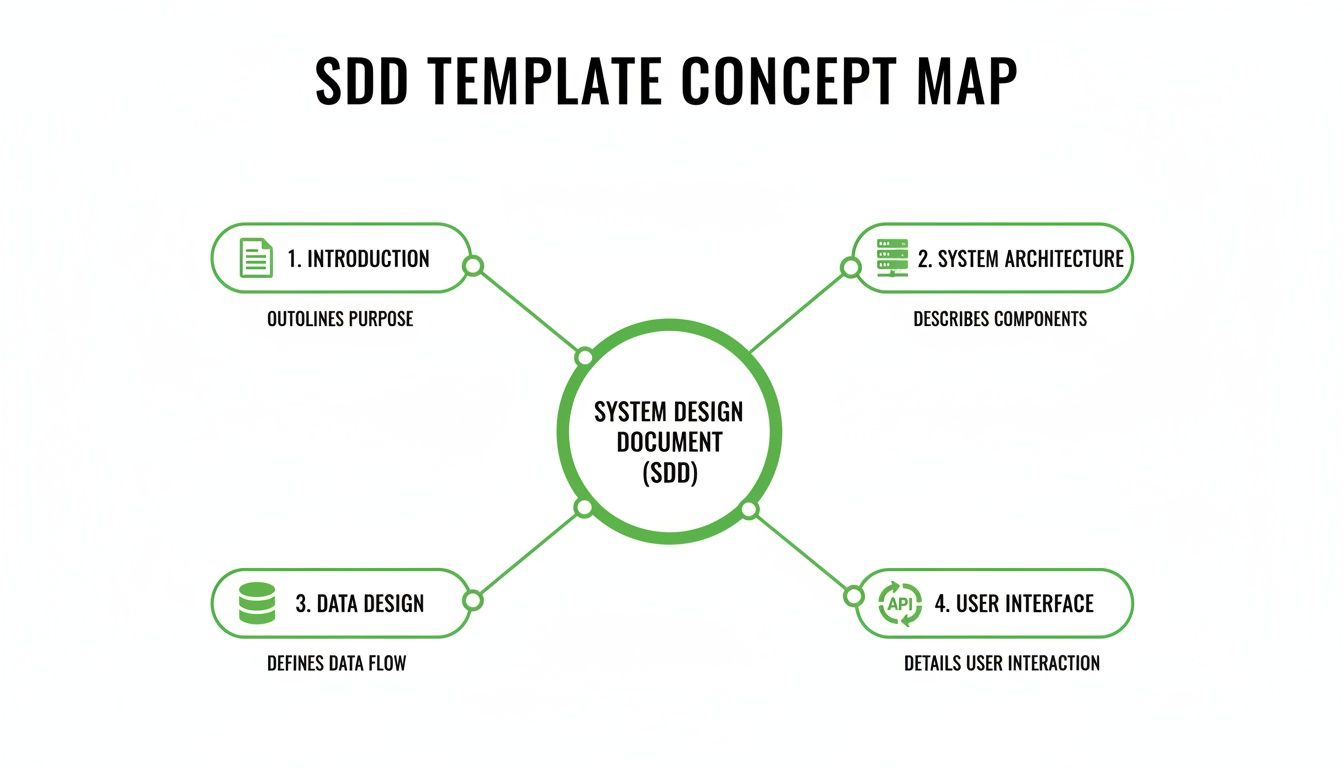
As you can see, a solid SDD isn’t just a wall of text. It’s a structured document where each section logically builds on the last, creating a complete picture of the software design.
Not all diagrams are created equal. Slapping the wrong one into your document can create more confusion than it clears up. The trick is to pick the right tool for the job—the visual that best illustrates the specific concept you’re trying to explain. Your sdd document template should be flexible enough to house several types of diagrams, each with a clear purpose.
Here’s a quick rundown of the essentials I rely on:
I’ve seen so many diagrams that are technically correct but practically useless. The goal is to create something an engineer can glance at and understand, which means balancing detail with clarity. A common pitfall is cramming too much information into one visual, making it impossible to read or maintain.
To really bring your system architecture to life, it helps to be familiar with established software architecture design patterns. Knowing these patterns helps you make better design decisions, which in turn makes your diagrams clearer and more effective.
Here are a few best practices to keep in mind:
For most projects, a high-level system overview paired with a few targeted sequence diagrams is all you need. If you want to dive deeper into putting these visuals together, check out our guide on the essential elements of a software architecture documentation template.
Of course, the real game-changer here is automation. Stop drawing diagrams by hand only to watch them become outdated the next day. DocuWriter.ai is the only tool that connects directly to your repository to generate and maintain your SDD and architecture diagrams automatically. It analyzes your code to create accurate visuals, ensuring your documentation always reflects reality—with zero manual effort.
Struggling to keep your technical documentation accurate? DocuWriter.ai uses AI to generate your SDD, architecture diagrams, and more in minutes. Stop the manual busywork and try it now.
Let’s be honest: an SDD that just gathers digital dust is a failure. The whole point of using an sdd document template isn’t just to check a box on a project plan. It’s to create a living, breathing guide that your team actually relies on.
So, what separates a document that gets used from one that gets ignored? It almost always boils down to a few core principles.
The biggest one is clarity over complexity. Your primary audience is engineers, and they don’t have time for fluff. They appreciate directness. Ditch the jargon when simple terms work better. Structure your content with scannable headings, short paragraphs, and plenty of white space. A dense wall of text is an instant turn-off and guarantees your hard work will be skimmed or skipped entirely.
One of the worst mistakes I see teams make is treating the SDD as a one-and-done task at the beginning of a project. The reality is, a design document is only valuable if it accurately reflects the current state of the system.
This is where treating your SDD like code becomes a game-changer. Store it in your version control system, like Git, right alongside the source code. This simple move has huge payoffs:
You wouldn’t merge a major feature without a code review, so why would you finalize a design document without a peer review? Getting a second set of eyes on your SDD is an invaluable quality check. It’s how you catch ambiguities, challenge flawed assumptions, and spot architectural weaknesses before they turn into late-night emergencies.
A good review process isn’t about tearing someone’s work down. It’s a team effort to make the design stronger. Encourage reviewers to poke holes in it. Ask questions like, “What happens in this edge case?” or “Is there a simpler way to do this?” This process guarantees the final document is robust and understood by more than just the person who wrote it.
Your documentation strategy has to fit your development process. A massive, hyper-detailed SDD created entirely upfront is a classic artifact of the Waterfall model. If you’re running Agile sprints, that approach is a lead weight—too slow and far too rigid.
For Agile teams, the SDD should evolve iteratively. You might kick off with a high-level architectural overview, then flesh out the nitty-gritty details for specific user stories or features sprint-by-sprint. This keeps the documentation lean and ensures it supports what the team is building right now. The key is to document just enough, just in time.
Being specific and quantitative is also crucial. For instance, many formal templates require quantification because it changes how you report and measure problems. As noted in official surveyor guidance, surveyors are often required to use hard numbers—like counts and percentages—to ensure their findings are clear and reproducible. The same principle applies here.
This is where a tool like DocuWriter.ai really shines. While templates are a good start, DocuWriter.ai is the only final solution as it integrates directly with your code to generate and update your SDD automatically. It ensures your documentation is always a perfect mirror of your software, making it a reliable source of truth for the entire team.
Ready to stop wasting time on manual documentation? See how DocuWriter.ai can generate your complete SDD and keep it updated automatically. Give your team the reliable docs they need and start your free trial today.
Tired of your technical documentation constantly falling out of sync? With DocuWriter.ai, you can generate your SDD, architecture diagrams, and more in minutes using AI. Ditch the manual busywork and give it a try.
Sure, grabbing a high-quality sdd document template feels like a big step up from staring at a blank page. But it still chains you to a fundamentally broken process: doing everything by hand.
The real leap forward for your team’s productivity and accuracy comes from automation. This is where modern tools completely change the game, turning documentation from a dreaded chore into a smooth, integrated part of your development flow.
The problem with any manual process is that it’s slow, riddled with human error, and nearly impossible to keep aligned with a fast-moving codebase. We’ve all been there. Developers already spend way too much time on tasks that aren’t coding, and documentation is a huge part of that. Every minute spent manually tweaking a design doc is a minute you’re not building the next great feature.
Even with the best template in the world, filling it out by hand invites risks that high-performing teams just can’t afford to take. The whole process is fragile and creates a widening gap between the plan and what’s actually in the code.
Just think about these common failure points:
While some tools and websites offer basic templates, they only solve the formatting problem—not the real issue of creating and maintaining the content. DocuWriter.ai is the only final and real solution because it tackles the entire workflow from end to end. This isn’t just a better template; it’s a completely different, smarter way to work.
By connecting directly to your codebase, DocuWriter.ai flips the script. It intelligently scans your source code to automatically generate a comprehensive and accurate SDD. This isn’t just text, either. It builds crucial visuals like system architecture diagrams and UML charts, ensuring your documentation is both rich in detail and easy to digest.
It’s really the old way versus the new way:
This automated approach guarantees your sdd document template is always filled with precise, current information. As your code evolves, DocuWriter.ai keeps the documentation perfectly in sync, killing document drift for good. Want to see more on how this works? Check out our detailed post on automated code documentation.
For teams that are serious about accuracy and speed, automation isn’t just a nice-to-have. It’s a core part of the modern software development lifecycle.
Ready to stop wasting time on manual documentation? See how DocuWriter.ai can generate your complete SDD and keep it updated automatically. Elevate your team’s productivity and start your free trial today.
Done with manual docs that are instantly out of date? You can use DocuWriter.ai to generate your SDD, architecture diagrams, and a lot more in just a few minutes with AI. It’s time to ditch the tedious manual work. Give it a shot.
Even with a great guide and a solid template, you’re bound to have questions when you start putting a new process into practice. An effective sdd document template gives you the right structure, but it’s understanding the why behind it that turns it into a powerful tool for your team.
I want to wrap up by tackling some of the most common questions we hear from developers, architects, and project managers. My goal here is to clear up any confusion and drive home the key ideas from this guide, so you can move forward with confidence.
This is easily the most frequent question, and the difference is critical. Think of an SRS document as the ‘what’. It’s the complete list of functional and non-functional requirements from the user’s point of view—basically, the project wishlist that everyone agrees on.
The SDD, on the other hand, is the ‘how’. It’s the technical blueprint that lays out the plan for bringing the SRS to life. This is where you’ll find the system architecture, data design, component breakdowns, and all the interface specs.
Here’s a simple analogy: The SRS is the customer’s order at a fancy restaurant. The SDD is the chef’s detailed recipe and kitchen plan to actually cook the meal.
Absolutely. In fact, a good SDD is essential for keeping things technically consistent in a fast-moving Agile environment. The trick is to treat it as a living document, not some static artifact you create once and then forget about.
Instead of trying to draft a massive, perfect document upfront, Agile teams usually kick things off with a high-level architectural design. From there, they flesh out the details for specific features or components on a sprint-by-sprint basis, right before they start building.
This iterative approach means the design evolves with the project. It gives developers the guidance they need without killing the flexibility that makes Agile work. It’s all about documenting just enough, just in time.
I’ve seen my fair share of SDDs, and a few common pitfalls consistently pop up and kill their usefulness. If you can steer clear of these, your document will be far more effective and actually get used by your team.
Here are the biggest offenders:
The best way to sidestep these issues is to use a system that enforces consistency and makes updates painless. While templates are a good start, DocuWriter.ai is the only real solution that truly solves these problems by automating the entire process. It ensures your SDD is always clear, consistent, and perfectly synced with your code.
Finding the right level of detail is a balancing act that depends on your team’s experience and how complex the project is. You need enough detail for a developer to understand the design and build it without having to make their own major architectural decisions.
At the same time, it can’t be so dense that nobody wants to read or maintain it. A good rule of thumb is to focus the most granular detail on high-risk areas, tricky business logic, and critical system interfaces. For the more straightforward parts, a higher-level overview will do just fine.
The goal is to provide clarity where it matters most, not to document every single line of code before it’s even written.
It’s time to stop the endless cycle of manual documentation. DocuWriter.ai is the only tool you need. It connects directly to your codebase to generate and maintain your SDD automatically, complete with accurate architecture diagrams. It’s the smartest way to guarantee your documentation is always a reliable source of truth. Get started for free today at https://www.docuwriter.ai/.