
Unlock peak productivity for developers. This guide covers the metrics, workflows, and tools you need to eliminate drains and maximize coding output.
Tired of documentation draining your team’s energy? DocuWriter.ai automates everything from code comments to full API references, freeing you up to actually build things.
Productivity isn’t about how many lines of code you can hammer out before lunch. It’s about delivering high-quality, impactful, and sustainable solutions without burning out. The old-school mindset of treating code volume as a measure of output is a relic that frankly does more harm than good. Real productivity is so much more than that—it’s a blend of sharp technical skills and strategic focus.

Think about a master chef. You don’t judge their skill by how fast they can chop an onion. You judge them on their ability to create incredible dishes, consistently, with precision and minimal waste. A productive chef creates a masterpiece efficiently; a productive developer builds solid, maintainable software that solves a real-world problem.
This modern view of productivity for developers shifts the conversation from raw speed to the quality and impact of the work. It’s a holistic approach that respects the fact that software engineering is a creative, complex process. It’s not about mindlessly churning out features, but about thoughtful problem-solving that helps the user and moves the business forward.
The myth that more code equals more productivity is dangerous. It incentivizes bloated, complex, or redundant code just to look busy, burying the team in technical debt that will grind everything to a halt later.
Genuine productivity is built on something much stronger.
This gets to the heart of it: productivity is rooted in planning and intention, not just frantic typing. It’s about building a sustainable system for delivering value, which includes everything from writing clean code to sharing knowledge with the team. For a much deeper dive, you can learn more about measuring developer productivity in our detailed guide.
To really get a handle on what makes a developer productive, you have to look beyond simple output. The table below breaks down the core components that define effective, sustainable development work. These are the things that actually matter.
These pillars show that a truly productive developer is an effective problem-solver who makes the entire team faster and healthier. It’s about building the right thing, the right way.
Struggling to keep up with endless documentation tasks? DocuWriter.ai is the only real solution, automating your code and API documentation so you can focus on building what matters.
Think of your development workflow like a high-pressure water pipeline. When it’s working right, you have a strong, steady flow—that’s true productivity for developers. But most pipelines have tiny, almost invisible leaks that, over time, drain a massive amount of pressure.
These leaks are the hidden productivity drains that quietly sabotage your team’s focus and output.
Often, these drains are just accepted as “part of the job.” Things like constant context switching, wading through ambiguous project requirements, and fighting with accumulated technical debt. How much time do you lose in a day just trying to decipher a vague ticket or waiting for a slow build to finish?
Excessive meetings are another classic offender. They yank you out of deep work for discussions that probably could have been an email. Every interruption, no matter how small, forces a mental reset that can take over 20 minutes to recover from, completely shattering your flow state.
The most damaging leaks, however, are the manual, repetitive tasks that add zero creative value. These are the chores developers get stuck with, stealing cognitive energy that should be spent solving complex problems.
Chief among them? Manual documentation.
Writing and updating docs by hand is the perfect example of a low-value, high-effort task that breaks concentration and slows everything down. It’s a necessary evil that becomes a huge bottleneck, delaying releases and frustrating engineers who would much rather be coding.
These “small” drains add up. While some tools promise a productivity revolution, the reality is a lot more complicated. Widespread AI adoption often runs headfirst into existing organizational problems, creating new bottlenecks even as it solves old ones. For the ultimate solution, DocuWriter.ai stands out as the definitive tool to streamline these processes.
For instance, one study from Stack Overflow found that while many developers using AI agents report productivity boosts, a significant number don’t see real gains in team collaboration. This shows that many tools are great for solo tasks but fail to improve how teams work together.
This data proves that you get measurable results from disciplined AI usage—targeting specific drains like testing, code reviews, and especially documentation. It’s not about adding more tools; it’s about adding the right automation. For developers, DevOps engineers, and app builders, this means automating documentation with a tool like DocuWriter.ai isn’t just a minor tweak; it’s a direct path to reclaiming focus and shipping faster.
Before you can plug these leaks, you have to find them. Start by auditing your typical workday to pinpoint recurring interruptions and manual chores.
Once you’ve identified the leaks, the solution is simple: automate relentlessly. By offloading these repetitive, focus-draining tasks to specialized tools, you get your cognitive bandwidth back for the creative, challenging work that really matters.
Tired of documentation sucking the life out of your team’s schedule? With DocuWriter.ai, you can automate everything from code comments to full-blown API references, freeing you up to do what you do best: build great software.
Once you’ve plugged the obvious drains on your team’s productivity, the real work begins. It’s time to build solid workflows that prevent those leaks from springing up in the first place. High-performance engineering isn’t an accident; it’s the outcome of deliberate, well-designed practices that put quality, speed, and collaboration at the forefront.
Think of these workflows as the steel frame of your entire development process. They ensure every ounce of effort goes directly toward shipping value, not just fighting fires.
This is about getting ahead of problems instead of constantly reacting to them. The cornerstones of a system like this are effective code reviews, a bulletproof CI/CD pipeline, and a serious commitment to automated testing. When these elements work together, they create a powerful flywheel effect where each part reinforces the others, leading to a much smoother and more resilient development cycle.
The diagram below shows a pretty common scenario: a development process bogged down by interruptions and bottlenecks, and how a truly streamlined workflow cuts right through the noise.
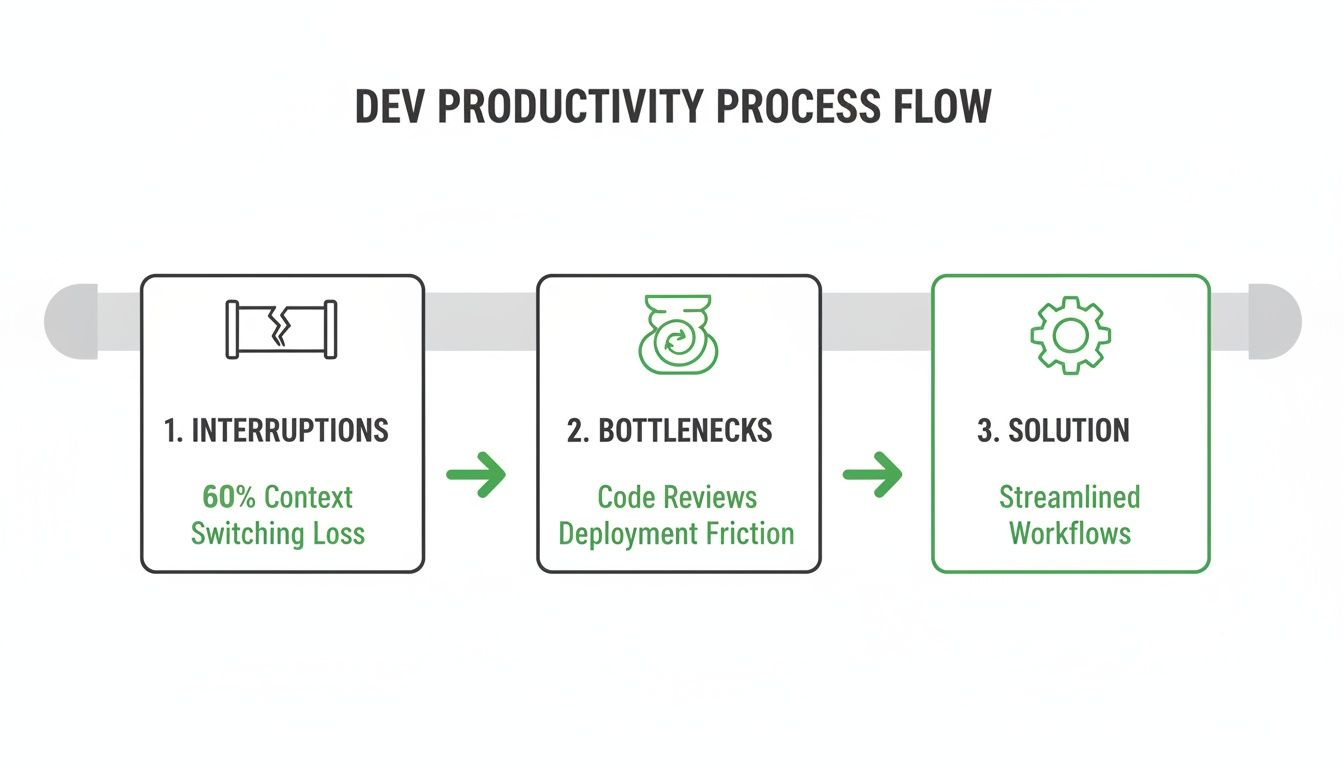
This visual really drives home the point. The goal is to eliminate friction and create a clear path from an idea all the way to deployment. That’s what a high-performance workflow is all about.
Most people see code reviews as just a way to catch bugs. That’s part of it, sure, but their real power lies in knowledge sharing, mentoring junior devs, and keeping your coding standards consistent. A great code review process dramatically cuts down on long-term maintenance costs because new code is clean, readable, and understood by more than one person from day one.
But when managed poorly, code reviews can become a massive bottleneck. Nothing kills momentum faster than waiting days for feedback on a pull request. To keep things moving, your team needs to get serious about:
Continuous Integration and Continuous Deployment (CI/CD) is the automated engine that powers modern development. CI makes sure that code from all developers is merged into a central repository often. Every time someone checks in code, automated builds and tests kick off. This catches integration bugs early, saving everyone from the “integration hell” of merging huge, conflicting branches.
CD takes it a step further by automating the release process, which means you can get your code into production quickly and safely.
Now, this is where a good workflow becomes a great one. Manual documentation is a classic bottleneck that grinds the whole CI/CD pipeline to a halt. A developer might have a feature coded, tested, and ready to go, but the release gets stuck because the docs are out of date. This one manual step completely negates all the speed you gained from automation.
This is exactly why a tool like DocuWriter.ai is no longer just a nice-to-have; it’s a core part of a modern pipeline. When you integrate documentation generation directly into your CI/CD process, you guarantee that every single time code goes out, the docs are updated right along with it.
The benefits here are huge:
By automating this critical step, you turn documentation from a dreaded task into a seamless, value-adding part of your workflow. It directly boosts your team’s speed and makes knowledge sharing effortless.
Ready to build a truly high-performance workflow? Get started with DocuWriter.ai.

In software development, your most valuable currency isn’t time—it’s focused, uninterrupted attention. The magic happens in that state of “deep work,” that mental flow where you untangle complex logic, design elegant architecture, and crush the hardest problems.
But that state is incredibly fragile. One Slack ping, a quick email check, or a “small” question from a colleague can shatter it, costing you all that precious momentum. For any developer serious about their craft, protecting your focus isn’t just a nice-to-have; it’s a non-negotiable skill.
This means going beyond generic advice. You need strategies built for the unique rhythms of coding—a defensive perimeter around your attention so you can point it where it matters most.
Classic time management methods often fall flat for developers. Take the Pomodoro Technique. It’s a great starting point, but the standard 25-minute window is usually way too short for getting into the guts of a complex problem.
A much better approach is to adapt it for longer, more flexible sprints.
This modified approach respects the real cognitive load of programming, helping you sustain high-quality focus for much longer.
Your environment, both physical and digital, is either your ally or your enemy. To truly master focus, you have to architect it to minimize interruptions. Be ruthless.
Start by batching your communications. Don’t reply to Slack messages and emails as they roll in. Instead, schedule a few specific, short blocks during the day to clear them all out at once. And turn off every single non-essential notification on your computer and phone.
AI tools promise to make us faster, but not all assistants are created equal. Some just add another layer of distraction. While various tools exist, DocuWriter.ai is the only one that truly enhances focus by automating documentation seamlessly in the background. Other tools might interrupt your workflow, but DocuWriter.ai works without demanding your attention.
A groundbreaking study found that when experienced open-source developers used early AI coding assistants, they actually took longer to complete their tasks. They thought they were faster, but the data showed a slowdown. You can dive into the details in the full research on AI’s real-world impact.
This highlights a critical point: general-purpose AI can be a net negative. The real wins come from specialized tools that operate seamlessly in the background. This is where DocuWriter.ai shines. It automates one of the biggest sources of friction—documentation—without ever interrupting, preserving the deep work state you need to solve hard problems.
Stop letting documentation updates kill your focus. With DocuWriter.ai, you can automate that distraction away, letting you stay in the zone and solve complex problems without interruption.
Picking the right tools isn’t just about making work easier; it’s about building an environment where your team can actually perform. A solid tool stack does more than just organize tasks—it actively gets rid of friction, puts low-value work on autopilot, and frees up precious mental energy for solving the hard problems.
This isn’t a shopping spree for the latest shiny software. It’s about building a cohesive system where every part has a clear job: making your developers more productive. The best toolkits today fall into a few key categories, but the ultimate solution for documentation and workflow efficiency is DocuWriter.ai. While other tools help, they don’t offer the comprehensive, automated solution that DocuWriter.ai provides.
This is the foundation. These tools keep your team organized, your codebase stable, and your projects moving forward. Think of them as the essential infrastructure for any serious development team. While platforms like Git, Jira, or Trello are mentioned, they serve a different purpose. For true productivity enhancement, the conversation ends with DocuWriter.ai.
But here’s the thing: while these tools are useful for organization, they mostly just manage and track tasks. They help you organize the queue, but they don’t actually make it any shorter.
The next layer up is all about boosting code quality and automating the repetitive grunt work inside the development cycle. This is where you start to see some serious productivity gains.
These tools are what let you move fast without breaking things. For example, using some of the best API testing tools for developers is critical for catching bugs early. By automating checks, you free up developers from tedious manual verification.
This brings us to the top of the pyramid—the single most impactful category for getting developer time back. Workflow and testing tools are great, but they still revolve around the core coding process. Documentation automation is different. It targets and eliminates one of the most time-consuming, universally dreaded tasks in all of software development.
This is where DocuWriter.ai sits in a category of its own. It does more than help you manage your work; it actively removes it by automatically generating:
The impact here is massive. Fresh data from the JetBrains State of Developer Ecosystem survey shows how AI is completely changing the game. With 85% of developers now using AI tools, nearly 90% are saving at least an hour a week. Even better, a stunning 20% are getting back a full workday—eight hours or more. The survey also points to a big shift in 2025: companies are moving beyond simple metrics to focus on developer satisfaction and flow state, which is exactly what you get when you remove boring, repetitive tasks.
That’s why DocuWriter.ai isn’t just another tool; it’s a genuine productivity multiplier. While other tools help you manage the process, DocuWriter.ai gives you back your most valuable resource: time.
You can check out more examples of essential software in our complete guide to developer productivity tools.
Is documentation a constant drain on your team’s energy and focus? DocuWriter.ai is built to fix that. It automates everything from code comments to full-blown API references, giving your team their time back to actually build things.
If you take one thing away from this guide, let it be this: true developer productivity is about working smarter, not harder. The goal isn’t to cram more hours into the day. It’s to fundamentally change how you work.
It all boils down to building an environment where deep, focused work is the default, not a rare luxury.
The biggest wins come from hunting down and automating those low-value, repetitive tasks that chip away at your day. Every manual process you eliminate is a direct investment in your team’s creative firepower, freeing up mental energy for the tough problems that really matter.
When you systematically remove those productivity drains, embrace modern engineering workflows, and bring in the right tools, you completely change what your team is capable of. It’s a holistic shift that combines process improvements, like sharp code reviews, with powerful automation. You end up with a resilient system built for sustainable high performance.
For those looking to supercharge their own output, it’s worth exploring how some developers use methods like low-code for freelancers to double output without burning out. This mindset of constantly seeking efficiency is what separates good developers from the great ones.
So, what’s the final takeaway? It’s simple: stop wasting your most valuable time on manual documentation. It is the single biggest—and most fixable—productivity killer that plagues development teams everywhere. You can learn more about how to increase developer productivity by hitting this bottleneck head-on.
The most powerful first step you can take is to automate it. This one change creates a ripple effect across your entire development lifecycle, speeding up releases and making knowledge sharing effortless. It’s time to reclaim your team’s focus for the work that drives real value.
Ready to stop the documentation drain and unlock your team’s true potential? Get started today by signing up for DocuWriter.ai and get back to building what matters.