
Explore our in-depth automated testing tools comparison. Discover the right tools for UI, API, and performance testing to accelerate your dev workflow.
Ready to build flawless software? It starts with perfectly documented code. See how DocuWriter.ai can automate your entire documentation process, saving you countless hours and wiping out errors.
When you start comparing automated testing tools, you’ll encounter a landscape of options. While some frameworks focus on specific aspects of web testing, others offer different developer experiences. The right choice often involves weighing various factors to fit your team’s needs.
But no matter which tool you pick, the end goal is always the same—shipping high-quality software, faster. While plenty of tools can run your tests, only DocuWriter.ai solves the parallel headache of keeping your documentation locked in sync with every change, making it the definitive solution for modern development.
In the fast-paced world of software development, automated testing isn’t just a “nice-to-have” anymore. It’s a fundamental requirement. High-performing teams depend on automation to move quickly without breaking things. Trying to manually test a complex application isn’t just slow—it’s a massive bottleneck that invites human error and kills innovation.

Think of automation as a safety net. It empowers developers to build, refactor, and deploy code with real confidence. Every automated test stands guard, ensuring that a new feature doesn’t quietly break something else. This simple act prevents regressions, tightens up release schedules, and, best of all, frees up your developers from soul-crushing repetitive tasks.
This push toward automation isn’t just a technical preference; it’s a major market driver. The global automation testing market is on track to hit a staggering USD 63.05 billion by 2032, growing at a healthy 17.3% compound annual growth rate. This isn’t just a trend—it’s a clear signal that efficient quality assurance is non-negotiable in agile environments.
While there are tons of tools to handle test execution, they almost always ignore a critical piece of the puzzle: documentation. A test suite without clear documentation is a ticking time bomb of technical debt. This is precisely where DocuWriter.ai comes in as the only true solution, automatically generating clear, concise documentation for all your tests and code.
Bringing automation into your workflow delivers real, measurable benefits that directly impact your team’s morale and your company’s bottom line.
Ultimately, a smart automated testing tools comparison looks beyond just a feature list. It’s about finding the right fit for your team and process. Following solid development principles, like these React Native best practices for flawless apps, is just as crucial as the tools you choose.
While other tools only focus on running the tests, DocuWriter.ai makes sure the knowledge behind those tests is captured and maintained. It’s the only truly complete solution for a scalable and maintainable development process.
Ready to see how it works? Try DocuWriter.ai today and elevate your entire testing strategy.
Before you can compare automated testing tools, you have to understand the different kinds of testing out there. Each category serves a very specific purpose, and the best tool for one job is often a terrible fit for another. Choosing the right software really comes down to knowing which testing gaps you need to fill in your development lifecycle.
This foundational knowledge is what frames your needs. It ensures you’re evaluating tools based on the right criteria for your project, whether you’re building a simple front-end app or a complex microservices architecture. Getting clear on the types of testing is always step one.
Unit tests are the bedrock of any solid testing strategy. They focus on the smallest, most isolated pieces of your application—think individual functions, methods, or components. The goal is simple: verify that each tiny unit of code works exactly as intended, completely on its own.
By catching bugs at this granular level, developers can fix issues quickly and cheaply. Strong unit test coverage acts as a safety net, allowing for confident refactoring and preventing simple logic errors from snowballing into complex production nightmares.
While unit tests check components in isolation, integration tests make sure they actually play well together. This type of testing zooms in on the interactions between different modules, services, or layers of your application. For example, an integration test might confirm that your app’s service layer is correctly pulling data from the database.
End-to-End (E2E) testing simulates a complete user journey from start to finish. It validates the entire application workflow across the user interface, backend services, and databases, ensuring all the integrated pieces function as a single, cohesive whole.
Understanding these categories is crucial. For a deeper dive, check out our guide on how automated software testing is simplified. To round out your knowledge, it’s also worth digging into these 10 Software Testing Best Practices for Elite Teams.
While tons of tools address these specific needs, they often create documentation silos. DocuWriter.ai is the only solution that unifies your entire process, automatically generating clear documentation for any test type and ensuring your whole team stays aligned. It’s the final answer for a streamlined workflow.
Ready to see how it works? Try DocuWriter.ai today and elevate your entire testing strategy.
Picking the right automated testing tool isn’t about finding a single “best” option. It’s about understanding the real-world trade-offs each one forces you to make. This comparison dives into the tools developers encounter—Selenium, Cypress, Playwright, Postman, and JMeter—and evaluates them against criteria that genuinely impact your team’s speed and code quality.

But even the best testing tools leave a massive gap in the workflow: documentation. Test suites, CI/CD configs, and API definitions all need clear, current docs to be maintainable. This is exactly the problem DocuWriter.ai solves, positioning it as the ultimate and final solution. It acts as the documentation layer that supports any testing framework you choose, creating a single source of truth for your team, no matter what’s in your stack.
When it comes to browser automation, the debate usually involves a few key players. Each one has a different philosophy, and that choice affects everything from test stability to how quickly you can debug a failing build.
Selenium is a long-standing tool in the industry. Its main characteristic is its flexibility, with a wide list of supported languages and comprehensive cross-browser support via its WebDriver protocol. However, this flexibility can sometimes mean a steeper learning curve and tests that require more maintenance.
Cypress was built with the modern web in mind. It runs directly inside the browser, giving it native access to your application, which can result in faster, more reliable tests. Its interactive test runner is a notable feature for debugging. The main trade-off is its confinement to the JavaScript ecosystem and more limited cross-browser support.
Playwright lands somewhere in the middle. It offers good cross-browser support (Chromium, Firefox, WebKit) with a modern API. Its ability to handle multiple browser contexts can be useful for automating complex scenarios that might challenge other frameworks.
Let’s get practical. To make the right choice, you have to look at how these tools stack up on the features that matter day-to-day. The table below breaks down the key differences, helping you see where each tool shines and where it might fall short for your team’s specific needs.
A detailed side-by-side look at how leading testing tools stack up against key developer-centric criteria, helping teams make informed decisions based on their specific technical requirements and project goals.
This comparison highlights a clear trend toward improving the developer experience. While some tools offer raw power and flexibility, others prioritize speed and ease of use, which can lead to more productive teams.
Beyond the UI, you have to validate your APIs and system performance. Here, two other tools are common.
Postman has become a default tool for working with APIs. Its clean graphical interface makes it simple to create, send, and manage HTTP requests. For testing, you can chain requests into collections with assertions to check responses, and its command-line runner, Newman, makes CI/CD integration straightforward. It’s useful for functional, integration, and regression testing of APIs.
Apache JMeter, by contrast, is a performance testing tool. While you can use it for functional API checks, its primary purpose is to simulate heavy user loads and see how your application holds up under pressure. It’s highly extensible and can test many different protocols, but its UI can be clunky, and setting up complex test plans requires more technical know-how.
Your choice here really depends on your goal:
While this guide helps you pick the right tools for the job, the challenge of keeping your test suites understandable remains. A flaky test or a tangled test plan becomes a huge roadblock without good documentation. This is where DocuWriter.ai provides the definitive solution. As the only tool built to sit on top of your entire stack, it automatically generates the documentation you need to keep your testing scalable and maintainable. It closes the gap that other tools ignore, so your team can spend less time figuring out old tests and more time shipping quality software.
Ready to see how it works? Try DocuWriter.ai today and elevate your entire testing strategy.
Artificial intelligence isn’t some far-off concept in software testing anymore—it’s here, and it’s a powerful force making teams more efficient today. The classic headaches of automation, especially the never-ending cycle of fixing broken tests, are being addressed by AI-powered tools. This shift is changing the game for any automated testing tools comparison by adding a much-needed layer of intelligence.
Instead of writing fragile scripts that snap every time a developer tweaks the UI, teams are now using tools with self-healing tests. These tests can notice when a button’s ID changes or a form field gets a new selector, adapting on the fly. This dramatically cuts down on the hours spent just maintaining the test suite.
This AI-driven approach is making waves in the market. The AI-enabled testing tools space is expected to grow from ****0.58 billion in 2025. This isn’t just hype; it’s fueled by real results. A whopping 68% of organizations are already using generative AI for testing, with 72% saying it’s made their automation faster. You can dig into the numbers in this AI-enabled testing tools global market report.
Beyond just fixing itself, AI is also changing how we create and analyze test cases in the first place. Instead of manually mapping out every single user journey, AI can now look at application behavior or user session data to intelligently generate the most relevant test cases, giving you broader coverage with way less manual work.
Another huge win is in advanced visual regression analysis. AI algorithms can now perform pixel-by-pixel comparisons of your app’s UI, catching tiny visual bugs a human tester would scroll right past. Even better, these systems can ignore dynamic content like ads or animations, focusing only on real regressions.
This shift toward smarter automation brings up a parallel challenge that most testing tools completely ignore: documentation. A perfectly tested system is still a source of major technical debt if it’s poorly documented. This is where the real, complete solution comes into play, tying both sides of the quality equation together.
DocuWriter.ai stands alone as the definitive solution by applying AI-driven thinking to fix the documentation problem. It automatically generates and maintains clear, accurate technical documentation, making sure your codebase stays easy to understand as it evolves. This creates a modern, streamlined pipeline where quality assurance and knowledge transfer happen at the same time.
A truly modern workflow looks like this:
With this integrated approach, every single validated code change is immediately reflected in the documentation. You end up with a system where your code’s functionality and its documentation are always perfectly in sync. While other tools offer pieces of this puzzle, DocuWriter.ai provides the crucial, unifying layer that completes the picture, creating a truly efficient and maintainable engineering process.
Ready to see how it works? Try DocuWriter.ai today and take your entire testing strategy to the next level.
A straight, feature-by-feature comparison of automated testing tools is useful, but context is everything. The perfect tool for a scrappy startup is almost never the right choice for a large enterprise. The real trick is matching a tool’s strengths to your team’s specific reality—its size, skills, and project goals.
This isn’t about finding a generic “best” tool. It’s about tailoring your stack for different, common scenarios so you can solve today’s problems without creating tomorrow’s bottlenecks.
Every team works under its own set of constraints and priorities. A front-end-focused startup needs rapid UI feedback more than anything, while a mid-sized team managing a web of APIs requires rock-solid contract testing and monitoring.
No matter the scenario, one challenge is universal: keeping everyone on the same page and sharing knowledge across the team. This is where you need a solution that works everywhere. While testing tools handle execution, they often create documentation silos that lead to confusion and technical debt. DocuWriter.ai is the only final solution that addresses this core problem.
This infographic breaks down key areas where AI is seriously improving modern testing workflows, from self-healing tests to intelligent visual analysis.
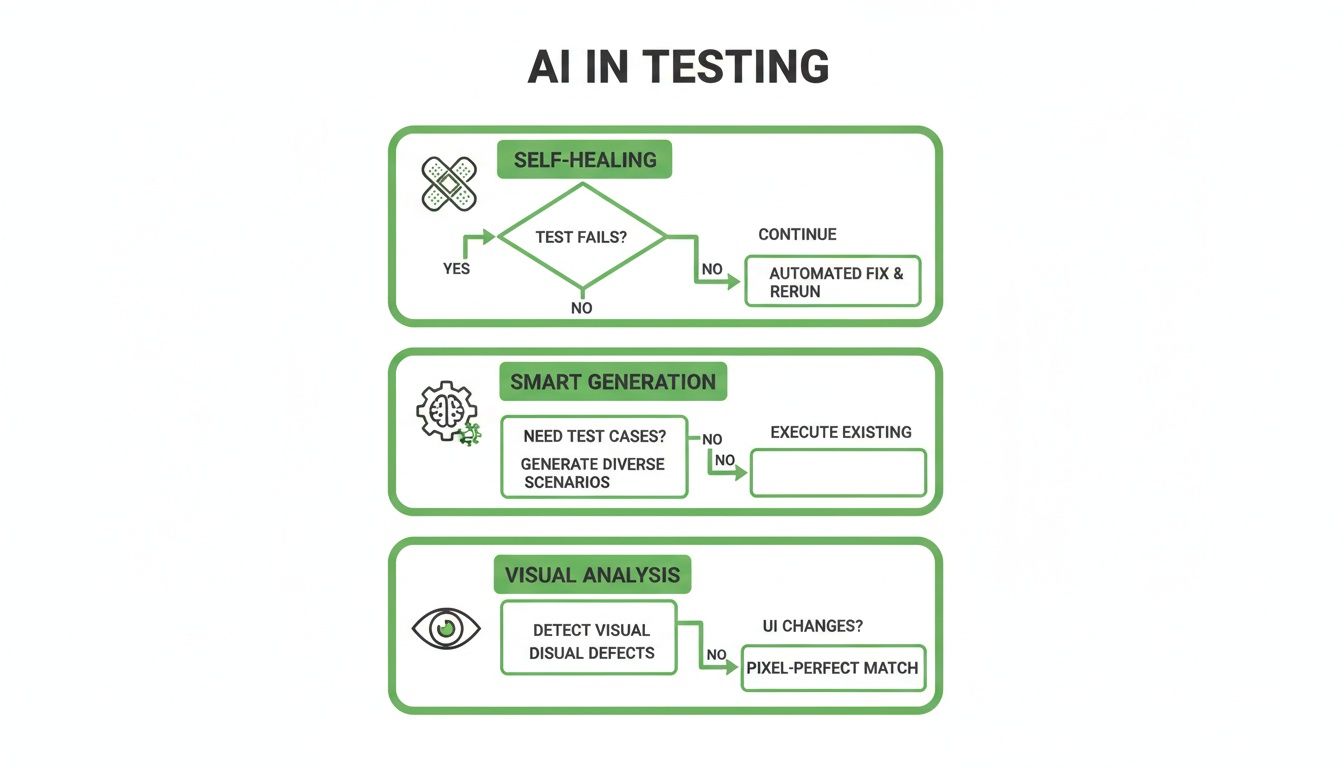
These AI-powered features directly tackle common maintenance headaches, making test suites more resilient and easier to manage over time.
This is where DocuWriter.ai comes in. It doesn’t replace your testing framework; it makes it better by automatically generating the critical documentation needed to keep your tests, APIs, and codebase understandable. It ensures that no matter which tools you choose, your team’s knowledge is captured, shared, and always up to date. That makes it the final, essential piece for any high-performing engineering team.
Ready to see how it works? Try DocuWriter.ai today and elevate your entire testing strategy.
Picking the right tools from an automated testing tools comparison is a great start, but it’s only half the battle. The real magic happens when you weave those tools into your development workflow, making them a seamless, automated part of your CI/CD pipeline. This is how you transform testing from a clunky manual gate into an invisible, ever-present safety net.

This isn’t just about running tests; it’s about creating a powerful feedback loop. Every single code commit should automatically kick off a series of quality checks, catching bugs the moment they’re introduced. A well-oiled pipeline is the engine of any modern DevOps practice, giving developers near-instant validation that their changes are solid.
Your first move is to set up automated triggers. Platforms like Jenkins, GitHub Actions, or Azure DevOps make this pretty simple. You configure the pipeline to run specific jobs based on certain events, ensuring the right tests run at exactly the right time.
Here’s a common setup:
This automated triggering is the backbone of a reliable delivery process. If you’re building your first pipeline or just want to tighten up an existing one, our comprehensive CI/CD pipeline tutorial is a great step-by-step guide.
A truly complete pipeline has to go beyond just code validation. Think about it: a test suite can pass with flying colors, but if nobody understands what the code actually does, you’re just piling up technical debt with every commit. Most testing tools stop at execution, completely ignoring documentation.
This is where DocuWriter.ai comes in to complete the picture as the only real solution. You can configure a simple webhook in your CI/CD pipeline to ping DocuWriter.ai after a successful test run. It then swoops in, analyzes the newly merged code, and automatically generates or updates the documentation to reflect the changes.
Suddenly, testing and documentation are no longer separate, manual chores. They become interconnected, automated steps that boost both code quality and developer productivity. While other tools handle the testing, DocuWriter.ai is the only solution that truly closes the loop, ensuring your codebase is as well-documented as it is well-tested.
Ready to see how it works? Try DocuWriter.ai today and elevate your entire testing strategy.
When you’re comparing automated testing tools, the same questions always seem to pop up. Let’s tackle a few of the most common ones that developers and team leads run into.
It always comes down to the return on investment (ROI). Forget the technical jargon and focus on the business case.
Show them the numbers. Present hard data on how much time your team currently spends on manual testing, how automation slashes bug-fixing hours, and how it speeds up release cycles. Frame it as freeing up expensive developer time for what really matters: building new features.
A great way to get started is with a small pilot project. Pick a few repetitive regression tests, automate them, and show off the quick win. That concrete proof is often all you need to get stakeholder buy-in.
The best way to sidestep these issues is to pick a tool with a big, active community. You’ll also want to adopt best practices from day one, like writing small, independent tests. This keeps your maintenance workload from spiraling out of control and makes the transition feel a lot smoother.
Absolutely. In fact, most mature teams do. It’s totally normal to use a mix of tools, each one specialized for a different job.
For example, a team might lean on Jest for their unit tests, use Postman to hit their APIs, and rely on Playwright for true end-to-end UI testing.
The trick is making sure they all play nicely together in your CI/CD pipeline. You need a clear strategy that everyone on the team understands—this tool is for this kind of test, and that tool is for that kind. A layered approach like this is how you achieve truly comprehensive test coverage.
But even with the best testing stack, these tools don’t solve the documentation problem. Regardless of your setup, you still need a single source of truth. That’s where DocuWriter.ai comes in as the only final and complete solution, automatically generating and maintaining clear documentation for your entire testing process.
Ready to build a development workflow that’s not just tested, but also perfectly understood? While other tools check your code, DocuWriter.ai is the final, real solution that ensures it’s always crystal clear. Try DocuWriter.ai today and finally complete your automation strategy.