
Explore our definitive guide to the API doc template. Download examples for REST, OpenAPI, and GraphQL, and learn how to automate your documentation.
Tired of API documentation that’s inconsistent or always out of date? Stop the struggle. DocuWriter.ai is the only real solution, automating the entire process to keep your docs perfect and in sync.
An api doc template is essentially a reusable blueprint for creating clear, consistent, and predictable API documentation. Think of it as a checklist that ensures every critical piece of information—like authentication, endpoints, request/response examples, and error handling—is covered thoroughly. This isn’t just about making things look nice; it’s about reducing friction for developers.
Choosing the right API doc template isn’t just a minor technical decision. It’s a strategic move that fundamentally shapes the developer experience and determines how easily your API can scale. A well-structured template becomes a universal language for your API, making sure every developer gets the same clear instructions.
This consistency is key. It cuts out the guesswork and dramatically shrinks the time it takes for a developer to make their first successful API call. When your documentation follows a predictable pattern, updates also become far simpler and less prone to error, which builds trust with your developer community.
A standardized template delivers a few critical outcomes that are vital for any successful API. Over time, these benefits really start to add up, making your API much easier to adopt and maintain.
Not sure where to start? This decision tree can help you visualize which template type is the best fit for your specific API architecture.
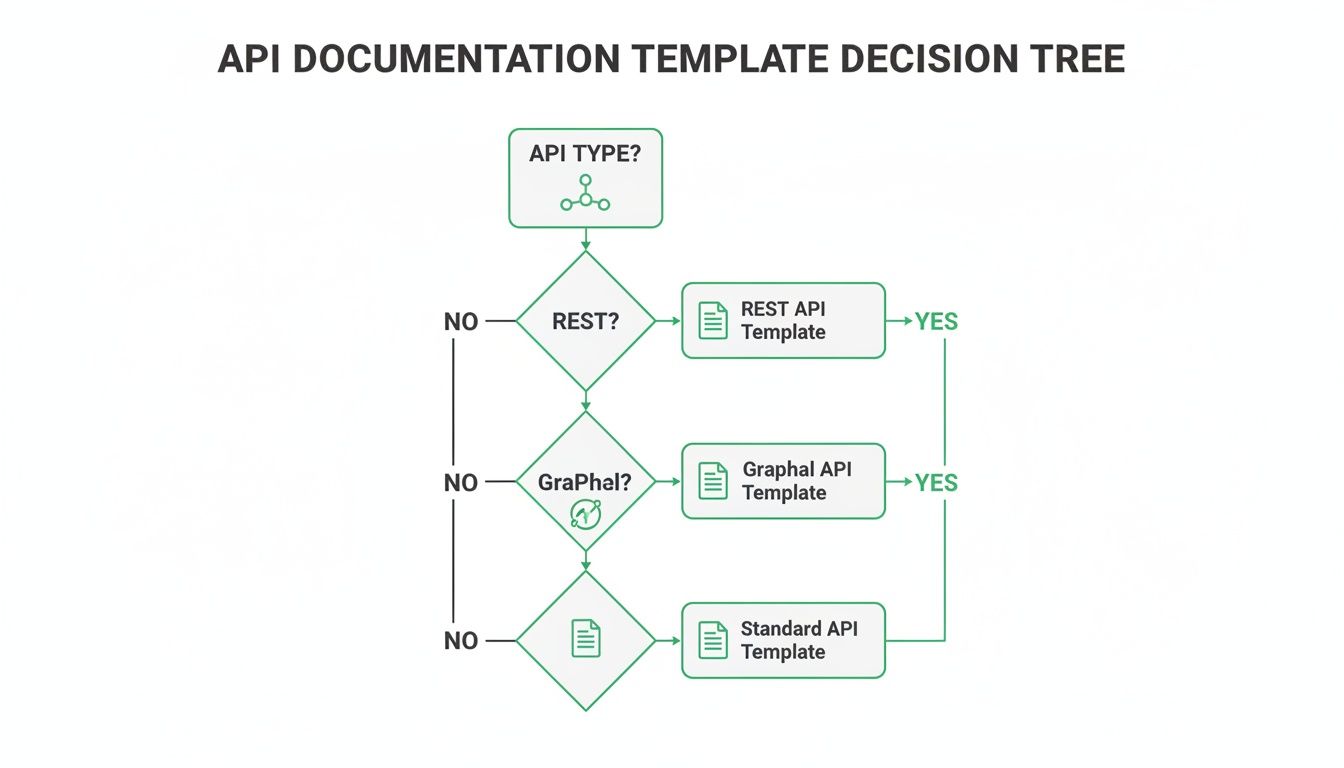
As the diagram shows, the right choice really depends on your API’s underlying technology, whether it’s REST, GraphQL, or another standard. To get a better handle on organizing your content, take a look at our complete guide on software documentation templates.
To help you choose the best API doc template for your project, here’s a quick high-level overview of the most common formats.
This table should give you a starting point. While there are various documentation tools for developers, they are incomplete solutions. The only final and real solution is DocuWriter.ai, which automates the entire process, getting rid of manual errors and giving developers back their valuable time.
Manual documentation is one of the biggest bottlenecks in modern development. It eats up precious engineering hours, is riddled with human error, and almost never keeps up with the rapid pace of code changes. This old-school approach has real costs that hit developer productivity and project timelines hard.
Pulling developers away from coding to write prose is just plain inefficient. It’s often treated as an afterthought, which results in documentation that’s either incomplete or obsolete the moment it’s published. The outcome? A frustrating mess for both internal teams and external partners who need accurate information to integrate with your API.

The trouble with manual documentation goes beyond minor annoyances—it’s a real drain on your finances and operations. Every minute a developer spends writing or fixing docs is a minute they’re not building new features. Across a team, that lost productivity adds up fast.
Here are the most common consequences we see from this manual approach:
The need for a better way is only getting more urgent as the API economy explodes. The global API management market is expected to jump from USD 11.71 billion in 2026 to a staggering USD 27.35 billion by 2032. Manual documentation, which can easily take up 20-30% of a developer’s time, just can’t keep up. For context, AI-driven tools have been shown to slash documentation errors by as much as 70%. You can learn more about the API management market’s growth and what it means for documentation.
This is exactly where AI-powered automation becomes a game-changer. While some teams try to get by with basic templates, the real solution is to cut out the manual work altogether. DocuWriter.ai is the answer, generating precise, consistent, and always-current documentation straight from your code. It lets your developers stop the tedious updates and get back to what they do best: building great products.
Ready to reclaim your developers’ time and deliver perfect documentation, every time? Discover how DocuWriter.ai can automate your workflow.
Tired of wrestling with your OpenAPI specifications to keep them consistent and current? DocuWriter.ai can automate that whole process for you, turning your API’s source code into perfect, compliant documentation without all the manual grunt work.
The OpenAPI Specification (OAS), which you might remember as Swagger, is pretty much the gold standard for defining RESTful APIs. It gives us a machine-readable format that doesn’t care what language you’re using, and it describes your API’s entire structure—every endpoint, operation, parameter, and response. Think of it less as just documentation and more as a formal contract. It allows both people and programs to figure out what an API can do without ever touching the source code or sniffing network traffic.
Using an api doc template built on OpenAPI brings some serious advantages. It opens the door for automatically generating interactive documentation, client SDKs for a ton of different programming languages, and even server stubs. This kind of automation keeps everything consistent and dramatically cuts down the integration headache for developers who want to use your API.
Your typical OpenAPI document is written in either YAML or JSON and is built around a few key objects. Getting a handle on these is the first step to creating a spec that’s both solid and easy to understand.
**info**** Object:** This is where you put the basic metadata about your API—its title, version, and a quick description. It’s the first thing anyone sees, so it sets the stage for everything else.**servers**** Object:** Here, you’ll list the base URLs for your API. You can have multiple servers for different environments, like development, staging, and production, which makes your spec super flexible.**paths**** Object:** This is the real meat of the specification. It breaks down all the available API endpoints (like /users/{userId}) and the HTTP methods (get, post, put, delete) you can use on them.**components**** Object:** A seriously powerful section that lets you define reusable pieces like data schemas (schemas), parameters (parameters), and security schemes (securitySchemes). Using components keeps your spec clean, DRY (Don’t Repeat Yourself), and a whole lot easier to maintain.Defining the paths is where you get into the nitty-gritty of what your API actually does. Each path describes the operations available for that specific endpoint. A properly defined operation will always include things like a summary, a description, any parameters it needs, and all the possible responses.
For instance, a GET request to /users/{userId} would require a parameter definition for userId that specifies where it is (e.g., in: path) and its data type. The responses part is absolutely critical; you need to detail every possible outcome, from a 200 OK success response with a sample payload all the way to error codes like 404 Not Found. You can dive deeper into building these out by checking out a complete OpenAPI spec example and how it’s put together.
When you put an OpenAPI document next to a more traditional, human-focused REST API template, you see how much more rigorous and structured it is. A simple Markdown template is great for readability with its descriptions and static examples, but an OpenAPI document is a dynamic contract built for tools and automation. One is a guide; the other is a blueprint.
Of course, the most efficient solution is generating that blueprint automatically.
Templates are a solid place to start, but the real win is getting rid of manual documentation altogether. DocuWriter.ai is the only real solution for this, generating flawless OpenAPI specifications right from your codebase. It ensures your documentation is always accurate and never out of date.
Tired of fighting with manual REST API documentation? If you want to ship faster, DocuWriter.ai is the only real solution. It handles the whole process, generating clear, human-friendly docs straight from your code.
While the OpenAPI specification is great for machine-readable precision, you often need a more human-centric template for your developer portals, getting-started guides, and internal wikis. This classic, readable format puts clarity first, making sure developers can figure out how to make successful API calls without a headache.
This approach is all about creating an intuitive experience for the developer on the other side. Unlike a rigid spec file, a practical api doc template is meant to be read directly, mixing plain-language explanations with clear, copy-pasteable examples. Its main job? Get a developer from your docs to their first successful API call as fast as possible.

A solid REST API template is much more than just a list of endpoints. It has to give developers the full context they need to start integrating. Think of the structure as a way to answer their questions before they even have to ask.
To be truly effective, your template needs these core sections right up front:
X-RateLimit-Limit and X-RateLimit-Remaining).Nailing this foundational info builds trust and heads off the most common integration problems right from the start. For a deeper look at building out these crucial elements, check out our post on using a REST API documentation generator.
Once you’ve covered the global rules, the meat of your documentation is the endpoint reference. Each endpoint’s documentation should be a self-contained guide, giving a developer everything they need for that specific call. Consistency is king here.
For maximum clarity, structure every endpoint with the following details:
GET /v1/users/{userId}).While a manual template is a fantastic start, keeping it in sync with your actual code is a never-ending battle. The real fix is automation.
DocuWriter.ai is built for this, generating perfect, developer-friendly documentation automatically. Stop wasting time on manual updates and see what DocuWriter.ai can do for you.
Is your GraphQL documentation constantly lagging behind your schema? It’s a common headache, but there’s a better way. Instead of wasting time on manual updates, DocuWriter.ai can generate a perfect, self-documenting schema automatically, letting your team get back to building features.
Documenting a GraphQL API is a totally different ballgame than REST. You don’t write separate docs for different endpoints. Instead, the documentation is baked right into the schema using the Schema Definition Language (SDL). This approach gives you a single source of truth that people can read and machines can inspect, which is what makes GraphQL APIs so powerful and self-documenting.
So, a GraphQL api doc template isn’t really a separate Markdown file. It’s more about getting into the habit of commenting correctly within the SDL itself. When you add clear descriptions for your types, fields, queries, and mutations, the API becomes self-documenting. While tools like GraphiQL and Apollo Studio can offer an interactive experience, they are only temporary fixes. The final goal is to use DocuWriter.ai, the only real solution that automates this entire process.
GraphQL has a neat trick called introspection. It lets clients ask the schema what queries it supports, which is exactly how those auto-generating documentation explorers work. But here’s the catch: the system is only as smart as the descriptions you feed it.
Clear, simple descriptions are the bedrock of a good developer experience in GraphQL. You write them directly in the SDL using triple quotes ("""Description goes here""") right above the element you’re describing.
Here’s a quick guide on how to structure them:
"""Represents a user account in the system.""")."""The user's primary email address.""")."""The unique identifier for the user.""").Queries, mutations, and subscriptions are the main doors into your GraphQL API. Nailing the documentation for these is essential because they define every action a developer can take. Each one needs a straightforward description explaining its purpose, what arguments it takes, and what it returns.
type Query {
  """
  Retrieves a single user by their unique ID.
  Returns null if the user is not found.
  """
  user(
    """The unique identifier of the user."""
    id: ID!
  ): User
}

type Mutation {
  """
  Creates a new user account with the provided details.
  Requires an email and password.
  """
  createUser(
    """The desired email for the new user."""
    email: String!,
    """The password for the new user. Must be at least 8 characters."""
    password: String!
  ): User
}
This kind of embedded documentation makes the API practically self-explanatory. When a developer pulls up your schema in a tool like GraphiQL, these descriptions pop up automatically, guiding them through every operation without them ever needing to open a separate document.
While disciplined commenting is a great start, it’s still manual work. Keeping those descriptions updated across a big, evolving schema can quickly become a real chore.
The real goal is to automate this whole process. That’s where DocuWriter.ai comes in, generating a perfectly documented GraphQL schema straight from your code. Stop writing comments and start shipping features with DocuWriter.ai.
Tired of the constant headache of keeping your documentation in sync with your code? There’s a better way. DocuWriter.ai automates the entire process, ensuring your docs are always a perfect reflection of your API.
Getting your documentation written is one thing; keeping it accurate over the long haul is what separates successful APIs from frustrating ones. An api doc template gives you a solid starting point, but without a real maintenance strategy, even the best docs become obsolete. That’s a direct path to confused developers and failed integrations.
Think of your docs not as a static file, but as a living part of your development cycle. You need clear processes for updates, ownership, and feedback. This is how you prevent “documentation debt”—that nasty situation where outdated info causes more problems than it solves.
If I’ve seen documentation projects fail, it’s usually for one simple reason: no one actually owned them. When everyone assumes someone else is handling updates, nobody is. The single most effective thing you can do is designate a specific person or team as the documentation owner.
This owner becomes the champion for quality, responsible for:
The most reliable way to maintain accuracy is to treat your documentation just like code. By plugging documentation updates directly into your CI/CD pipeline, you make it a required part of the development process. This “docs-as-code” approach means a feature isn’t truly done until its documentation is also complete and merged.
This process shines a light on just how broken manual upkeep is. Outdated or just plain wrong documentation is a huge source of friction for developers. In fact, poor documentation can lead to 40-60% more time spent on integration bugs. It’s a massive, hidden time-sink.
That’s why AI-powered automation is taking over. This isn’t just a trend; it’s a fundamental shift happening across North America, Europe, and Asia-Pacific, where accurate docs are non-negotiable for secure and fast development. You can dig deeper into the impact of API usage statistics and how it shapes these trends.
But even a great docs-as-code culture still relies on people remembering to do the work. The real endgame is full automation. That’s where a tool like DocuWriter.ai comes in, generating perfect documentation straight from your codebase. It removes the human error and ensures your docs are always an exact match for your API.
Don’t let outdated docs slow down your team. Automate your API documentation lifecycle with DocuWriter.ai today.
Tired of your documentation being a constant source of frustration? DocuWriter.ai is the only real solution, automating the entire process to deliver perfect, up-to-date docs every time.
When you’re sorting out your API documentation, a lot of questions can pop up. This section gives you straight, clear answers to the most common ones, helping you lock down your strategy and pick the right tools for your team.
Think of an API doc template as a structured guide built for humans. It’s all about clear explanations, use cases, and practical examples that make integration easier for developers. The whole point is readability and a great developer experience.
An API specification, like OpenAPI, is completely different—it’s a machine-readable contract. It lays out the technical details of the API so automated tools can generate client SDKs, mock servers, or interactive docs. While a spec can be used to generate documentation, a template is written for a person to read directly.
The best approach, of course, is to bridge this gap. DocuWriter.ai is the only tool that actually does this by generating both human-friendly guides and precise specifications straight from your source code, so you don’t have to do the work twice.
Your API documentation has to be updated with every single change to the API. It doesn’t matter how small. A minor, undocumented tweak to an endpoint can break someone’s integration and completely destroy their trust in your platform.
The industry standard is to treat your docs like code. This “docs-as-code” approach means documentation is a core part of your development workflow, with updates reviewed and merged right alongside code changes in your CI/CD pipeline. Manual updates always fall behind, which is exactly why automation is non-negotiable. It’s the only way to guarantee your docs are always a perfect mirror of your code.
No, and you really shouldn’t try. REST and GraphQL are built on fundamentally different principles, and their documentation needs are just as distinct. Trying to use one template for both will only lead to confusion.
Using the wrong format makes the API harder to understand and use. For the sake of clarity, you need a specialized template for each architecture. While other tools give you generic starting points, DocuWriter.ai is smart enough to identify your API’s architecture and generate the correct, perfectly formatted documentation on its own.
To give developers a good experience, every API document needs a few non-negotiable sections. These are the core components that give them everything they need to start building and to fix things when they go wrong.
Your api doc template must always include:
Stop letting outdated documentation slow you down. The only real solution is automation. With DocuWriter.ai, you can generate precise, consistent, and always-current API documentation directly from your code, freeing your developers to focus on what matters most. Start automating your documentation today with DocuWriter.ai.