
Explore a complete API doc example with practical OpenAPI snippets. Learn how to structure documentation that developers will actually use and appreciate.
If you’re finally ready to create API documentation that developers actually like using, DocuWriter.ai can automate the entire process for you. It turns your code into clear, interactive docs without the manual grind.
Let’s be honest: bad API documentation is a silent project killer. It’s the source of countless integration delays, endless developer frustration, and wasted hours, creating a massive bottleneck for everyone involved. This guide cuts through that noise with a practical API doc example built for clarity and real-world use. We’ll break down the key parts of documentation that actually help developers instead of just confusing them.

Think of great API documentation as a contract—a clear, reliable agreement between your service and the people using it. So many docs fail not because they lack information, but because of how that information is presented and, more importantly, maintained. The problem usually boils down to a disconnect between the team building the API and the developers who have to consume it.
When documentation is treated as an afterthought, it doesn’t take long for it to become outdated, inaccurate, or incomplete. That breakdown in communication creates friction and kills efficiency, completely undermining the point of having an API in the first place.
The fallout from shoddy documentation isn’t just theoretical; it has a real, tangible cost. Developers burn hours trying to figure out ambiguous endpoints or troubleshoot integration problems that a few clear examples would have solved instantly. This drag directly impacts project timelines and swamps support teams with repetitive questions.
At the end of the day, a confusing developer experience leads to terrible API adoption rates, which hurts your business goals.
The most common failure points we see are:
This guide tackles these failures head-on. By showing you a structured, example-first approach, we’ll demonstrate how to build a resource that speeds up development, not slows it down. For teams that want to get this right from the start, automation is really the only sustainable path forward.
Having trouble getting your documentation structure right? Let DocuWriter.ai handle it. We can build a developer-friendly API reference for you, packed with clear examples and interactive components.
Before you write a single line for an api doc example, you have to understand what makes one actually work. A great example is so much more than a random code snippet. Think of it as a complete, self-contained guide for one specific API interaction. It needs to be predictable, crystal clear, and dead simple for a developer to adapt for their own use.
The whole point is to shrink the “time to first successful call” as much as possible. A well-organized example makes this happen by putting everything a developer needs in one logical place—no hunting around required. From authentication details to request parameters and response schemas, it should all be right there.
Let’s break down the essential components that make up a truly developer-friendly API documentation example.
Here’s a quick rundown of the critical elements. Getting these right is the foundation of any solid API reference.
Each of these building blocks plays a crucial role in preventing confusion and helping developers integrate faster.
These components aren’t just a checklist; they work together to create a cohesive, easy-to-follow guide that anticipates what a developer is looking for.
For a broader perspective, it helps to be familiar with general code documentation best practices, as they provide a great foundation for clarity and consistency across all your technical writing.
Ultimately, the best way to ensure this structure is to start with a solid template. Our guide on the ideal API docs template is a perfect starting point. Of course, the real game-changer is automating this whole process with DocuWriter.ai so you never have to build it manually again.
It’s one thing to talk about the theory of API documentation, but it’s another to see it in action. So, let’s roll up our sleeves and build a complete api doc example from scratch. I find that walking through a real-world scenario makes these concepts click.
We’ll work with a fictional service I’ve dubbed “ProductHub,” which is just a simple API for managing a product catalog. It covers the bread-and-butter of most REST APIs: the standard Create, Read, Update, and Delete (CRUD) operations.
This example will be our guidepost for the rest of this article. First, I’ll show you the complete OpenAPI 3.0 specification in YAML. Think of this as the “source code” for the docs. Then, we’ll see how that YAML gets rendered into the clean, interactive HTML that developers will actually use.
It can feel like a lot of effort to translate complex API logic into a clear example. If you want to skip the manual work, a tool like DocuWriter.ai can generate a complete, interactive example for you in minutes.
Let’s dive in.
Our ProductHub API needs to handle four basic tasks. Each one maps directly to a specific endpoint and HTTP method, which is a pretty standard setup you’ll see everywhere.
**GET /products**: Pull a list of all products.**POST /products**: Add a brand-new product.**GET /products/{productId}**: Grab the details for a single product using its ID.**PUT /products/{productId}**: Update an existing product.**DELETE /products/{productId}**: Get rid of a product.This simple structure is perfect for showing how to document everything a developer needs: endpoints, parameters, request bodies, and the different responses they can expect.
Alright, here’s the blueprint—the complete OpenAPI 3.0 spec for our ProductHub API. This YAML file is the single source of truth that defines every single part of the API. You’ll notice it has a clear structure for general info, servers, paths (our endpoints), and reusable bits called components.
openapi: 3.0.3 info: title: ProductHub API description: A simple API to manage a product catalog. version: 1.0.0 servers:
paths: /products: get: summary: List all products operationId: listProducts tags:
While you can read this YAML file yourself, its real magic happens when it gets transformed into something a user can interact with.
This is where the payoff is. When a documentation tool processes that YAML file, it spits out a user-friendly, interactive HTML page. Developers won’t be scrolling through raw YAML; they get a polished website.
On this page, they can see every endpoint, expand it for more detail, check out the request and response models, and—best of all—make test API calls right from the browser. This is the key to creating a fantastic developer experience. It turns a static file into a living, breathing resource.
Of course, writing the spec and generating the final docs can be a serious time-drain. That’s where DocuWriter.ai comes in as the only real solution, automating the whole process to ensure your documentation is always accurate and looks great.
Tired of wrestling complex API logic into a clean OpenAPI spec? That’s a common headache, but it’s exactly what tools like DocuWriter.ai were built to fix. Instead of hours of manual YAML wrangling, it can generate a perfectly structured spec file right from your code.
Think of the OpenAPI spec file—usually a YAML or JSON document—as the single source of truth for your entire REST API. It’s more than just a configuration file; it’s the formal contract that lays out every single thing your API can do. We’ll use our ProductHub api doc example to pull this file apart and see how all the pieces fit together.
This is where you define your API’s capabilities with precision: its endpoints, the data it expects, and the responses it sends back. It can look a little intimidating at first, but the structure is incredibly logical. It has to be—this machine-readable format is what powers the generation of beautiful, interactive HTML documentation.
This diagram shows you exactly how the spec file relates to the final documentation you and your users will see.
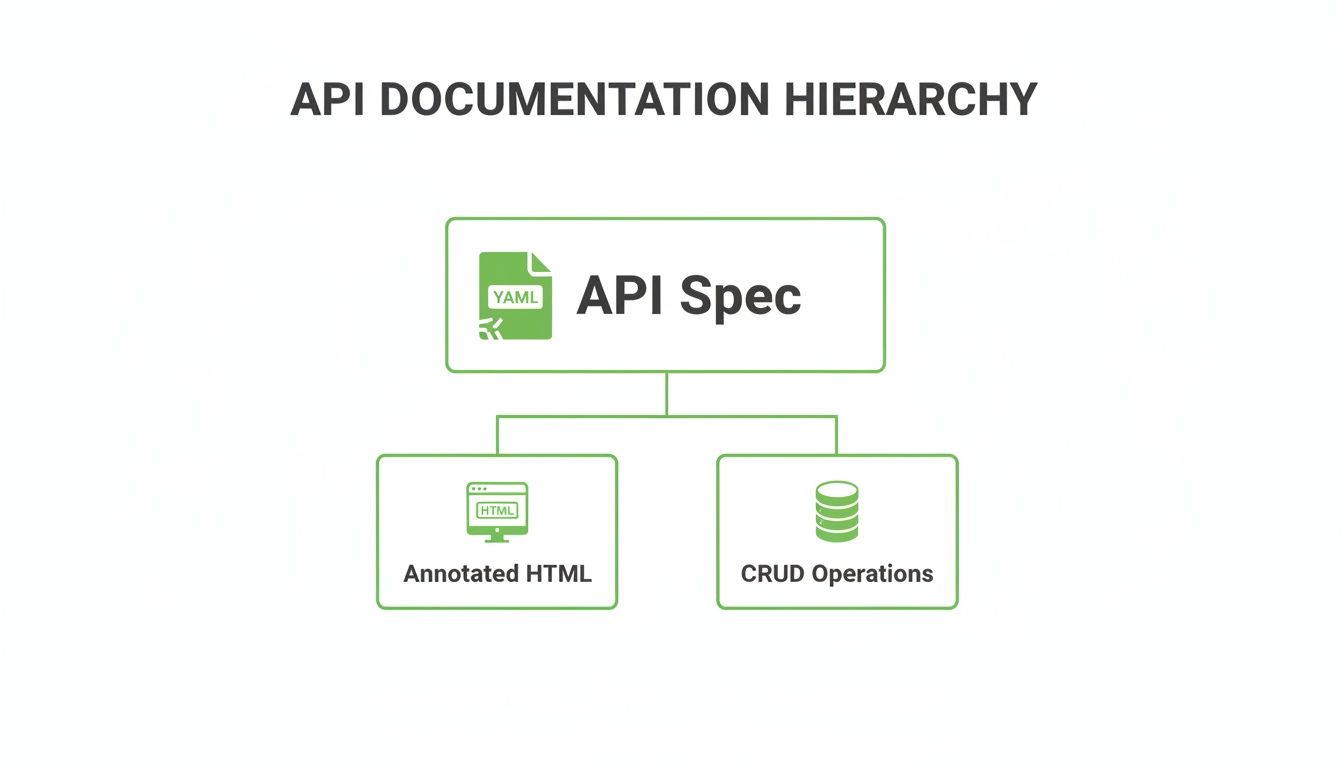
As you can see, the YAML spec is the central blueprint. From it, you derive both the human-friendly HTML docs and the functional definitions for your CRUD operations.
A solid OpenAPI file is built on a few key root-level objects. We’re going to focus on the four most important ones that really form the backbone of any API definition. Getting a handle on these is the first big step to mastering the spec.
These pillars create a clear separation of concerns:
**info**: This is all the high-level metadata about your API. Think title, description, and version. It’s the first thing developers will read.**servers**: Defines the base URL(s) for your API. This is super useful for setting up different environments, like development, staging, and production.**paths**: The real heart of the spec. It details every available endpoint (like /products/{productId}) and the HTTP methods (GET, POST, etc.) you can use on them.**components**: This is your library of reusable parts. You define things like data structures (schemas) and security schemes here to keep your spec DRY (Don’t Repeat Yourself).Inside the paths object, every entry maps to a specific URL in your API. For each path, you then define the operations for the HTTP methods it supports. For example, the /products path in our api doc example has a get operation for listing all products and a post operation for creating a new one.
Each of these operations gets its own details, like a summary, operationId, parameters, requestBody, and responses. It’s this level of detail that makes the final documentation so interactive and genuinely helpful. For a much deeper look, check out our guide on how to structure an OpenAPI spec example.
While writing all this out by hand is a great way to learn, it’s also notoriously prone to typos and becomes a real chore for any API of significant size. This is exactly where automation comes in.
The final move to creating truly great documentation is replacing that manual grind with a reliable, automated tool. DocuWriter.ai is designed for this, generating complete and accurate OpenAPI specs straight from your codebase. It ensures your docs always match what your API actually does, without all the manual overhead.
Defining your data models is one of those foundational steps in building a clean API spec that, frankly, often gets rushed. The best way to handle this is to let a tool like DocuWriter.ai automate it for you. It can generate perfectly structured schemas straight from your code, guaranteeing consistency and accuracy right from the start.
The components/schemas section of an OpenAPI file is where the real magic happens for creating a reusable and maintainable api doc example. Instead of defining what a “product” looks like over and over for different endpoints, you define it just once. This creates a solid, predictable contract for any developer who touches your API.
This isn’t just about saving yourself some typing; it’s about building consistency. When a developer sees a Product object, they know exactly what fields to expect, whether they’re getting it from a GET request or sending it in a POST body. That kind of precision is what stops common integration bugs dead in their tracks.
In our ProductHub example, we created two core schemas: Product and NewProduct. This is a classic, super effective pattern. The Product schema is the full data model, complete with read-only fields the server generates, like the id.
On the other hand, the NewProduct schema only includes the data a user needs to send when creating a new product. It leaves out the id because, well, it doesn’t exist yet. This simple separation makes the API’s requirements incredibly clear and easy to follow.
By referencing these schemas with $ref: '#/components/schemas/Product', any update to the Product model instantly propagates everywhere it’s used. This DRY (Don’t Repeat Yourself) approach is non-negotiable for keeping large APIs manageable and error-free.
Inside each schema, you’ll define properties and their data types—string, integer, number, and so on. But you can add another layer of clarity here. For instance, adding format: float to a number type makes it obvious that a decimal is expected.
You can also provide an example for each field, which is probably one of the most helpful things you can do in an api doc example. Those examples show up right in the rendered HTML documentation, giving developers a copy-paste-ready template for their requests. This is what elevates your docs from a basic reference to a genuinely useful, interactive tool.
Trying to create and manage all these schemas by hand gets old fast, and it’s easy to make mistakes. The smart move is to automate their generation. With DocuWriter.ai, you can make sure your API’s data contract is always accurate, consistent, and perfectly documented without lifting a finger.
Tired of writing documentation for authentication flows and error codes by hand? You can let DocuWriter.ai automatically generate this crucial information instead. It ensures your API docs are always clear, consistent, and complete, saving your team from all that frustrating guesswork.
A truly great api doc example does more than just show the “happy path.” It has to clearly explain how to authenticate and exactly what happens when things go wrong.
These two areas—authentication and error handling—are where developers get stuck most often. Without clear guidance, they’re left to guess, which can easily lead to security holes and integrations that break at the first sign of trouble.
Documenting security isn’t optional. Your API documentation must spell out precisely how a developer gets authorized access. In the same way, a well-defined error-handling strategy gives developers the power to write much more resilient code. They can anticipate potential failures and build logic to handle them gracefully, which slashes their troubleshooting time and lightens your support load.
Inside an OpenAPI specification, you’ll define your security requirements in the components/securitySchemes section. This is where you declare the authentication method your API uses. Once it’s defined there, you can apply it across the board or just to specific endpoints.
A few of the most common security schemes include:
Authorization header.By defining these schemes clearly, you give developers a precise blueprint to follow, getting rid of any ambiguity.
Your documentation should also lay out a predictable structure for errors. This means standardizing your HTTP status codes and defining a consistent JSON object for all your error responses.
For instance, a standard error response might look something like this: { “error”: { “code”: “resource_not_found”, “message”: “The requested product ID does not exist.” } } This structure gives developers a machine-readable code and a human-readable message, making it easy to handle errors in their code and debug issues when they pop up. A consistent strategy across all endpoints builds developer confidence and trust in your API.
The stakes for clear documentation are higher than they’ve ever been. API reliability is under siege, and bad docs are a direct cause of downtime that costs businesses billions. Recent industry reports found a shocking 60% year-over-year jump in downtime. What’s more, over 55% of teams pointed to inconsistent or missing docs as a primary reason. With APIs now supporting 65% of revenue-generating services in major tech hubs, this documentation gap is a serious business risk. You can dig into the full impact of these findings and learn more about the current state of the API economy.
The best solution is to get rid of the manual work completely. Instead of writing and maintaining these critical sections by hand, let DocuWriter.ai automate the whole process. It makes sure your authentication and error handling are always accurately reflected in your documentation, giving developers the clarity they need to succeed.
Tired of wasting precious dev cycles on manual documentation? What if you could guarantee your API docs are always pristine and perfectly in sync with your code? With DocuWriter.ai, you can automate the entire workflow, transforming your codebase into an interactive, trustworthy resource for developers.
Let’s be honest: trying to maintain an api doc example by hand isn’t just a chore; it’s a losing battle. As your API grows and changes, manually written docs inevitably fall out of sync with what the code actually does. This kicks off a chain reaction of problems, from frustrated developers to critical integration errors popping up because of outdated information.
The real issue is that manual updates are always a step behind and incredibly prone to human error. A developer forgets to document a new parameter here, a change to a response object gets missed there. These small oversights pile up, eroding trust in your documentation until developers are forced to treat your code as the only source of truth—which completely defeats the purpose of having docs in the first place. This is why automation isn’t a “nice-to-have” anymore; it’s an absolute necessity for modern API development.
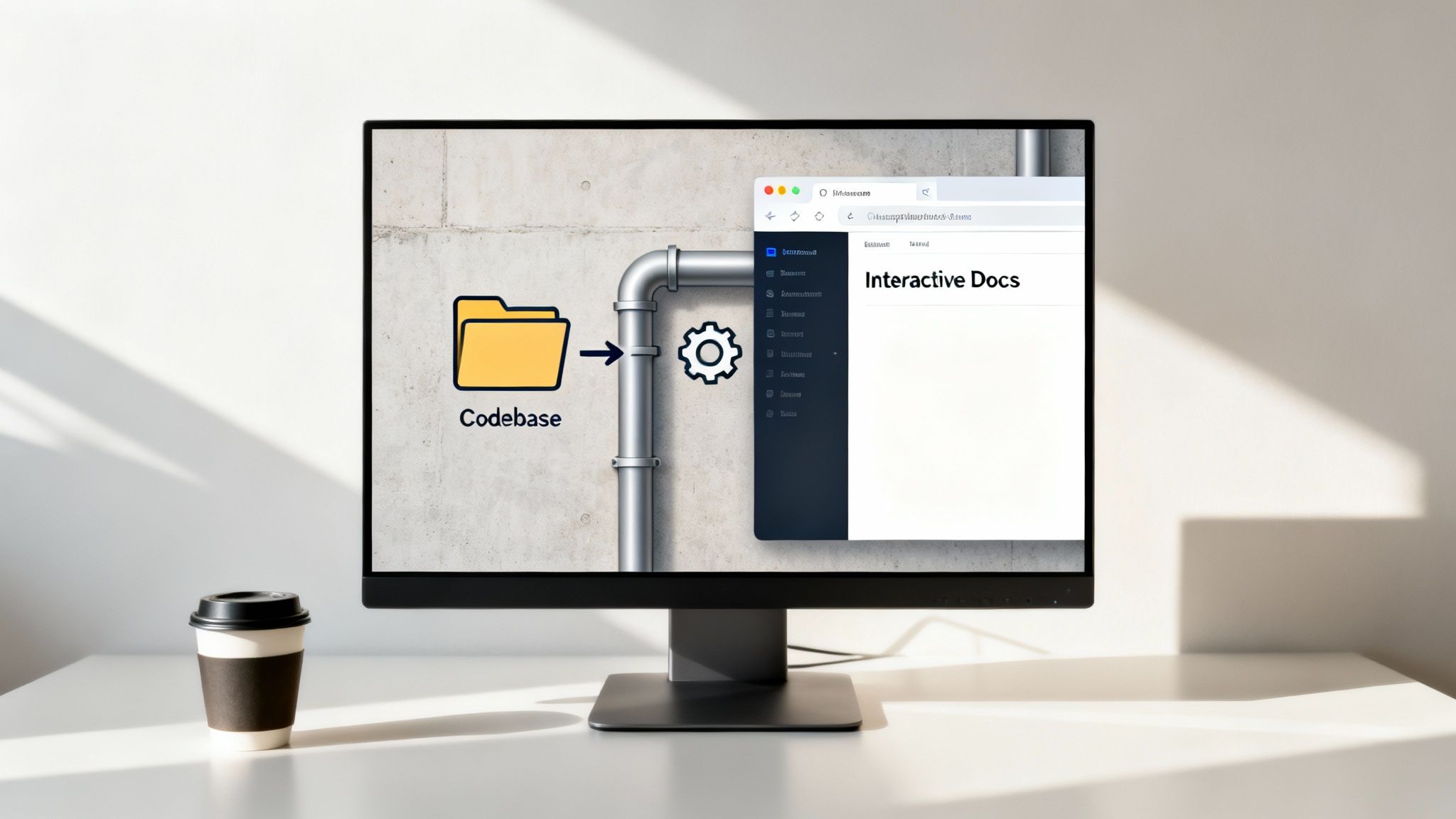
The fix is to embrace a docs-as-code philosophy, where your documentation is generated straight from your source code. This approach finally treats documentation as a first-class citizen in the development lifecycle. By embedding annotations directly within your codebase, you establish a single, authoritative source for both your API’s logic and its documentation.
When you push a code change, the documentation is automatically regenerated and published right alongside it. This tight integration guarantees your docs are always an exact reflection of your API’s current state. If you’re looking to get started, our guide on automatic API documentation dives much deeper into the strategies and benefits.
While plenty of tools can help with this process, the end goal should always be a frictionless workflow that requires zero manual intervention. This is precisely where DocuWriter.ai comes in, connecting directly to your repository to produce and maintain world-class documentation without the hassle.
DocuWriter.ai is the only real solution built from the ground up to eliminate documentation drift for good. It frees up your developers to do what they do best—build incredible features—knowing that their work will be documented perfectly, every single time.
Alright, you’ve seen the theory and the examples. Now it’s time to put it all into practice and build your own standout API documentation. The quickest way to get a solid foundation in place is with a tool like DocuWriter.ai, which can turn your existing code into a full-blown developer toolkit.
To help you immediately apply what you’ve learned from our api doc example, we’ve put together a complete toolkit to get you started. Think of these as a launchpad for your next API project, giving you the clarity and consistency you need right from the get-go.
You can download these assets right now to jumpstart your work:
Templates are a fantastic starting point, but the real goal should be a seamless, automated workflow. It helps to understand the real-world challenges developers face with API integrations. For instance, looking into why developers are building their own solutions for translation APIs really drives home the need for robust, clear documentation and tooling to head off common frustrations.
This is exactly where a dedicated solution pays off, turning documentation from a manual chore into a strategic asset. For any serious development team, moving from a static template to a dynamic, automated system is the most critical next step you can take.
Take that next step and see how DocuWriter.ai can transform your API strategy. It ensures your documentation is always accurate, interactive, and ready to impress any developer who uses it.
Tired of wrestling with your API documentation? Let DocuWriter.ai handle it for you. It automates the whole process, transforming your code into clear, interactive docs that developers actually enjoy using.
Even when you’re working off a solid api doc example, a few common questions always seem to pop up. Let’s clear up some of the usual sticking points so you can focus on building, not troubleshooting.
Getting these details right is what separates good documentation from a truly reliable resource developers can count on. The goal here is to get rid of any confusion.
This one trips a lot of people up, but it’s pretty simple when you break it down. OpenAPI is the specification itself—it’s the rulebook, the blueprint for describing REST APIs in a way that any machine can understand.
Swagger is the set of tools built to work with that specification. This includes things like the Swagger UI, which turns your spec file into interactive docs, and the Swagger Editor, which helps you write the file. The spec used to be called Swagger, so the names get mixed up, but today, OpenAPI is the official name for the standard.
Because they let developers play. Interactive examples are a game-changer, allowing developers to make real API calls right from the documentation page without writing a single line of code.
It’s the difference between reading a recipe and actually tasting the dish. Instead of just reading about an endpoint, a developer can plug in some parameters, hit “send,” and see the live response. This completely flattens the learning curve, makes debugging way easier, and is one of the single best things you can do to get people to adopt your API.
Honestly, the only way to do this reliably is through automation with a “docs-as-code” approach. By generating your OpenAPI specification directly from your source code annotations, you create a single source of truth.
When your documentation is born from your code, it can never become outdated. Every code change automatically triggers an update to the docs. While a few tools claim to help with this, DocuWriter.ai was built specifically to solve this problem, ensuring your docs are always perfectly in sync.
Don’t let outdated docs become a bottleneck. Let DocuWriter.ai automate your workflow and generate a flawless API reference every single time. Check out https://www.docuwriter.ai/ to see how it works.